Mapal One Release - 11.06.2026

Big and bold additions to the product.
New functionality that changes what you can do.


Engagement – Events

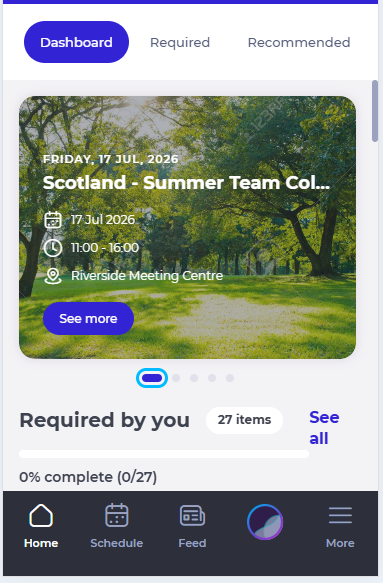
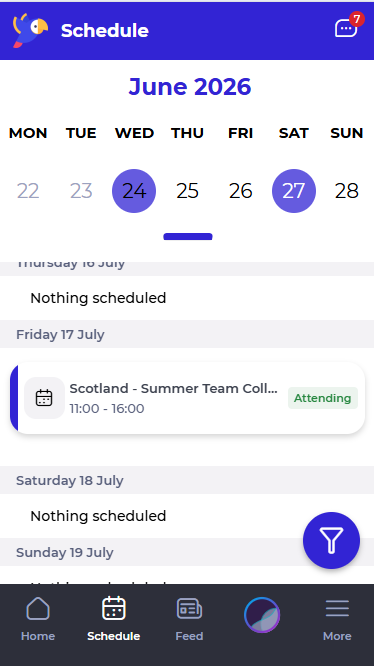
Mapal One now allows Employees to discover, view, and manage company events in one place. Employees can access key event details, open the full event page on desktop and mobile, and manage their RSVP directly within the experience.

Why this matters
Employees needed a simpler way to find company events, understand important details, and respond without moving between different tools or locations. Bringing Events into Mapal One makes event communication clearer and easier to manage.

Key benefits

Refinements that make things smoother and better.
Performance, usability and quality upgrades.

Mapal One – Brazilian Portuguese Support

Mapal One now includes Brazilian Portuguese as a supported language option. Employees can select Brazilian Portuguese where language selection is available and use Mapal One in their preferred language.

Why this matters
Teams working in Brazilian Portuguese needed a more localised experience. Adding language support makes Mapal One easier to use and helps more Employees engage with the platform in a way that feels natural to them.

Key benefits

Engagement – Recognition Comments

Mapal One has improved the comments experience within Recognitions. The thank-you message option is now displayed only when the logged-in Employee receives a recognition, while the standard comment area remains available for general comments.

Why this matters
This update makes it easier to understand when to send a thank-you message and when to leave a standard comment, creating a clearer and more intuitive experience.

Key benefits


** Please Note: These features were released on the 11.06.2026. Availability on iOS may take up to 24 hours due to Apple’s review process and will require the app to be updated to the latest version.

Flow Learning Release - 11.06.2026


Enhanced Appraisal Sign-off Settings

We've introduced a redesigned Sign-off Settings experience within Appraisals, making it easier to configure when learner and reviewer responses become visible throughout the appraisal process.

Alongside the new streamlined configuration, administrators can now define visibility rules based on learner sign-off, reviewer sign-off, or mutual sign-off, including the ability to keep responses hidden until both parties have completed their appraisal.

Why this Matters

Previous appraisal settings only supported response visibility based on individual sign-off actions. This enhancement introduces additional visibility controls while simplifying the configuration experience, allowing organisations to control when learner and reviewer responses become visible throughout the appraisal process.

Key Benefits

  • Simplified configuration: Configure sign-off and response visibility settings from a single streamlined interface
  • Greater control: Define when learner and reviewer responses become visible throughout the appraisal process
  • Mutual sign-off support: Keep responses hidden until both learner and reviewer have completed sign-off

Enhanced Noticeboard Audience Selection

We've enhanced Noticeboard audience selection to allow departments and job titles without assigned learners to be included when creating a Noticeboard item.

A new option enables administrators to display and select empty departments and job titles, ensuring Noticeboard items can be targeted to organisational structures before learners are assigned.

Why this Matters

Previously, departments and job titles without assigned learners could not be selected when defining a Noticeboard audience. This enhancement provides greater flexibility when setting up communications for new departments, job titles, or future organisational changes.

Key Benefits

  • Future-proof communications: Target departments and job titles before learners are assigned
  • Greater audience flexibility: Include empty departments and job titles when configuring Noticeboard audiences
  • Reduced administration: Avoid the need to revisit and update Noticeboard audiences when learners are later added to a department or job title


Collections Summary Report: Learner Identifiers

We've enhanced the Collections Summary report to include learner identifier information, making it easier to distinguish between learners with similar or identical names.

Where learner identifiers are in use, the report now includes an Identifier column displaying each learner's External ID. The identifier is available both within the onscreen report and exported report downloads.

Why this Matters

When multiple learners share the same or similar names, it can be difficult to identify the correct learner within report results. This enhancement improves reporting consistency across Collections reports and makes it easier to accurately identify learners when reviewing or exporting data.

Key Benefits

  • Improved learner identification: Easily distinguish between learners with similar or identical names
  • Consistent reporting experience: Aligns the Collections Summary report with the Collections Detail report
  • Enhanced reporting accuracy: Export and review report data with greater confidence using learner External IDs


Collections: Alphabetical Ordering in Assign Learning

We've updated the Collections list within Assign Learning so that Collections now display in alphabetical order.

Collections are now ordered by Collection name from A to Z, making it easier for administrators to quickly find and select the Collection they want to assign.

Why this Matters

Previously, Collections were ordered by date created, which could make it difficult to locate specific Collections as the list grew. Alphabetical ordering provides a more predictable browsing experience and helps reduce time spent searching for the correct Collection.

Key Benefits

  • Easier to find Collections: Locate the Collection you need using alphabetical ordering
  • More predictable list ordering: Collections now display from A to Z by name
  • Improved assignment experience: Spend less time searching when assigning Collections to learners


Brazilian Portuguese Language Support

We've added Brazilian Portuguese as an available language across Flow MS, allowing organisations to provide a more localised experience for Brazilian learners and administrators.

Brazilian Portuguese can now be selected throughout the platform where language preferences are supported, helping organisations deliver content and communications in the most appropriate language for their users.

Why this Matters

For organisations operating across multiple regions, providing content in the correct language helps improve accessibility, engagement, and the overall user experience. This enhancement introduces dedicated support for Brazilian Portuguese, ensuring users can interact with Flow MS in their preferred language.

Key Benefits

  • Expanded language support: Brazilian Portuguese is now available throughout Flow MS
  • Improved learner experience: Deliver platform content and communications in users' preferred language
  • Enhanced localisation: Better support for organisations with Brazilian-based learners and teams


Updated "What's New" Experience

We've updated the "What's New" link within Flow MS to direct users to our new Knowledge Base release notes area.

This new location provides a centralised home for Flow release information, making it easier to browse and access the latest updates.

Why this Matters

Release information is now hosted within our Knowledge Base, giving users access to Flow release notes and supporting help content from a single location. This makes it easier to discover product updates and access additional guidance when needed.

Key Benefits

  • Centralised information: Access Flow release notes and supporting Knowledge Base content from a single location
  • Improved navigation: Easily move between release information and related help articles
  • Better visibility: Browse recent and historical Flow updates through a dedicated release notes area


Experiences V2: Rebuilt Scenario Canvas

The scenario canvas has been completely redesigned with a cleaner interface and improved performance. Updates include full-screen editing for every node, dark mode, multi-select actions with keyboard shortcuts, and the ability to preview scenarios from any point in the journey.

Why this Matters

A more streamlined workspace makes it easier to focus on creating engaging learning experiences without unnecessary distractions.

Key Benefits


Custom Characters for Scenarios

Scenario creators can now add their own characters to scenario tiles, using familiar faces from their organisation or characters designed specifically for the learning experience.

Why this Matters

Training scenarios can feel more relevant and engaging when they reflect real people and workplace situations.

Key Benefits


Six New Translation Languages

Mapal Studio now supports content creation in Afghan (Pashto and Dari), Albanian, Khmer, Macedonian, Serbian and Tigrinya.

Why this Matters

More language options help organisations deliver training that is accessible to a wider range of learners.

Key Benefits


Per-Lesson Access Controls

Administrators can now control access at lesson and course level, in addition to organisation-wide permissions.

Why this Matters

Sensitive or department-specific content can be restricted to the right audience more easily.

Key Benefits


Editor Names in Version History

Version history now displays the name of the person responsible for each change made to a lesson or course.

Why this Matters

Provides greater visibility into content updates and supports review and audit processes.

Key Benefits


"Created By" in the Dashboard

The dashboard now shows who originally created a lesson or course through the right-click menu.

Why this Matters

Makes it easier to manage large content libraries shared across multiple authors.

Key Benefits

  • Easier collaboration between teams
  • Quickly identify content owners
  • Better visibility across shared libraries

Flow Learning Release - 28.05.2026


Operator Switcher

We've introduced an Operator Switcher within Flow, allowing users with access to multiple operators to switch their active operator directly within the application.

The existing Companies page remains available as part of this update.

Why this Matters

Users with access to multiple operators can now switch between them more quickly and easily directly within Flow.

This creates a more seamless experience and aligns Flow more closely with the operator switching experience already available in Mapal OS.

Key Benefits

  • Faster switching: Move between operators directly within Flow
  • More seamless experience: Access the correct operator without interrupting your workflow
  • Improved navigation: Switch operators using the new Operator Switcher within Flow

Improved handling of inactive content within Collections

We've improved how Collections handle inactive content across multiple learning item types, including External Training, Workbooks, Appraisals, Goals, and Knowledge Checks.

Previously, some inactive or archived items could still appear within Collections in L&D Settings, continue to contribute to Collection item counts, or behave inconsistently depending on the item type.

This update improves consistency across Collections by ensuring inactive content is excluded from future Collection assignments and removed from Collection builder views and item counts, while preserving existing learner allocations and progress.

Why this Matters

Inactive content could previously remain visible within Collections, making Collections harder to manage and causing item counts to become inaccurate.

Behaviour also differed between item types, creating an inconsistent admin experience across the platform.

These improvements help ensure Collections only display active content going forward, while still preserving historical learner access and completion data where Collections were previously assigned.

Key Benefits

  • Improved consistency: Archived and disabled content now behaves more consistently across Collections
  • Cleaner Collection management: Only active content appears within Collection builder views
  • Accurate item counts: Collection item counts in L&D Settings better reflect active included content
  • Preserved learner progress: Existing learner allocations and completion history remain unchanged


Long Term Absence status available via API

We've added Long Term Absence (LTA) status to the MOS Trainee Read Only API response, allowing customers to identify whether a learner is currently marked as Long Term Absent within Flow MS.

The new field is now available within the following endpoint:

/api/v1/{company_slug}/client_mapal_os_trainee_read_only

Why this Matters

Customers using the MOS Trainee Read Only API can now keep external systems more accurately aligned with learner status information held within Flow MS.

Previously, Long Term Absence status was available within Flow MS but was not exposed via API responses, making it difficult to synchronise reporting and learner management processes externally.

Key Benefits

  • Improved synchronisation: External systems can now reflect Long Term Absence status from Flow MS
  • Better reporting: Customers can include LTA status within their own reporting and integrations
  • More complete API data: Learner status information is now more closely aligned between Flow MS and API responses


Flow Learning Release - 14.05.2026


Improved handling of archived modules in Training Structures

We have improved how Training Structures handle archived modules.

When a SCORM or Module Builder module is archived, any restrictions referencing that module are automatically removed, preventing invalid or blank restrictions from remaining in the structure.

Why this Matters

Archiving a module could previously leave behind broken restrictions, making Training Structures harder to update and maintain.

This update removes that friction and helps keep Training Structures valid and easy to manage.

Key Benefits

  • Automatic clean-up: Restrictions linked to archived modules are removed automatically
  • Easier updates: No need to manually fix broken or blank restrictions
  • More reliable behaviour: Training Structures remain valid after module changes

Improved Appraisal Question setup

We have improved how additional information settings work when configuring appraisal questions.

The Additional information mandatory for manager setting is now only available when Show additional text field is enabled. If the additional text field is switched off, the mandatory setting is also switched off automatically.

Why this Matters

Reviewers could previously be blocked from completing appraisals if a mandatory additional information field was enabled but the field itself was not visible.

This update helps prevent invalid appraisal question setups and makes configuration clearer.

Key Benefits

  • Clearer setup: Mandatory additional information is only available when the text field is visible
  • Fewer blockers: Reviewers are not blocked by mandatory fields they cannot complete
  • More reliable configuration: Invalid combinations are prevented automatically


Training Calendar in L&D menu for read-only users

We have made the Training Calendar visible in the L&D menu for users with read-only access.

Users with the appropriate permission can now access the Training Calendar through normal navigation, with read-only functionality applied.

Why this Matters

Users with read-only access could previously only access the Training Calendar via a direct link, making the feature harder to find and use.

Adding it to the L&D menu improves visibility and aligns it with how other features are accessed.

Key Benefits

  • Improved visibility: Training Calendar is accessible from the L&D menu
  • Consistent navigation: Aligns with how other features are accessed
  • Appropriate access: Users have read-only functionality as expected


Org Templates

Admins can now create organisation-wide templates that authors can reference directly inside the agent, helping teams create more consistent, on-brand content.

Why this Matters

Makes it easier to standardise course structure across larger authoring teams.

Key Benefits

  1. Faster course creation
  2. More consistent content
  3. Better standardisation across teams

New Learner Sidebar Navigation

A redesigned learner sidebar navigation is rolling out gradually to improve how learners move through content.

Why this Matters

Helps learners find content faster and navigate courses more easily.

Key Benefits

  1. Simpler navigation
  2. Cleaner learner experience
  3. Easier access to content

Conversation Analytics (v1)

Authors can now view learner pathways, transcripts, audio interactions, and grading data within conversations.

Why this Matters

Provides better visibility into learner performance and friction points.

Key Benefits

  1. Identify where learners struggle
  2. Review transcripts and audio
  3. Access learner interaction insights

Upgraded Narration & Video Scene Editor

Delay and punctuation markers can now be added directly inside the narration editor for editable video.

Why this Matters

Gives authors more control over narration timing and pacing.

Key Benefits

  1. Improve narration timing
  2. Create smoother pacing
  3. Reduce rerecording efforts

Mapal One Release - 30.04.2026

Big and bold additions to the product.
New functionality that changes what you can do.


AI – Upgrade to Latest Version
Mapal One was upgraded to use the latest version of the AI component, enabling access to new capabilities and improvements.
This update supports enhancements such as document upload and search, while ensuring existing AI functionality continues to work as expected.

Why this matters
Updating to the latest AI version allows Mapal One to benefit from ongoing improvements and new features. This ensures Employees have access to the most up-to-date AI capabilities.

Key benefits
• Access to new features: Employees benefit from enhancements such as document upload and search
• Improved performance: The latest version includes updates and optimisations
• Future-ready: Mapal One stays aligned with ongoing AI development
• No disruption: Existing AI functionality continues to work as expected


Evaluations – Hide Scores When Disabled
Mapal One hid all scoring information in Evaluations when scoring was disabled. When an evaluation was configured without scores, Employees saw results without any score-related details.

Why this matters
Some evaluations are intended to focus on completion rather than scoring. Previously, scoring information could still be displayed, which created confusion and did not reflect the intended configuration. This update ensures evaluations are presented correctly.

Key benefits
• Clear presentation: Evaluations display results without scores when configured
• Consistent behaviour: All evaluation views respect the scoring setting
• Improved clarity: Employees see only relevant information based on the evaluation type
• Flexible configuration: Supports different evaluation styles without impacting the experience


Engagement – View Likes on Comments
Mapal One allowed Employees to see who has liked a comment on a post. This aligned the behaviour with how likes are displayed on posts.
Employees can now view the list of colleagues who have liked a comment, providing clearer visibility of engagement within discussions.

Why this matters
Previously, Employees could see who liked a post, but not who liked a comment. This inconsistency caused confusion and limited visibility within conversations. Aligning this behaviour created a more consistent and transparent experience.

Key benefits
• Improved visibility: Employees can see who has liked a comment
• Consistent behaviour: Comment likes follow the same interaction as post likes
• Better engagement awareness: Employees better understand participation within discussions


Refinements that make things smoother and better.
Performance, usability and quality upgrades.


Workforce – Consistent Behaviour for Shifts and Holidays Settings
Mapal One ensured that the application consistently respected the Shifts and Holidays settings across the Schedule and all related areas. Employees only saw shift and holiday information when those features were enabled for them.
When either setting was disabled, the system removed the related information and actions while keeping the overall Schedule visible for other content.

Why this matters
Previously, the behaviour of Shifts and Holidays settings was not always consistent. In some cases, information could still appear or areas could behave unexpectedly when a setting was disabled. This created confusion and made the application feel unreliable.
This enhancement ensures the experience is clear, predictable, and aligned with how settings are intended to work.

Key benefits
• Consistent experience: Shifts and Holidays only appear when enabled
• Reduced confusion: Employees do not see irrelevant or unavailable features
• Clear system behaviour: Settings behave predictably across all areas
• Cleaner interface: Unavailable actions and sections are removed when not applicable


Issues we have resolved.
Fixes to improve stability and reliability.


Engagement – Posts – File Deletion Behaviour
Fixed an issue where deleting an attached file triggered an unexpected download before removal.
Files are now removed directly without opening a new tab.


** Please Note: These features were released on the 30/04/2026. Availability on iOS may take up to 24 hours due to Apple’s review process.

Flow Learning Release - 30.04.2026


Restricted SCORM modules in Collections

Restricted SCORM modules can now be included in Collections, allowing organisations to include them where appropriate while maintaining strict permission controls.

Only users with the correct permission can view and add restricted SCORM modules when building Collections. Collections that contain restricted modules can only be assigned by users with the required permission. Collections containing restricted modules are not available for use within Training Structures.

Why this Matters

Restricted SCORM modules were previously excluded from Collections, limiting how organisations could structure and assign learning. This update provides greater flexibility while ensuring that access to restricted content remains tightly controlled.

Key Benefits

  • Controlled visibility: Restricted SCORM modules are only visible to users with the appropriate permission when building Collections.
  • Restricted assignment: Collections containing restricted modules can only be assigned by users with the required permission.
  • Flexible learning design: Restricted modules can now be included in Collections where appropriate.
  • Protected structure rules: Collections containing restricted modules are not available for use within Training Structures.

Notifications – Improved email safeguards

Consistent safeguards have been introduced across Flow email notifications to ensure emails are only sent to valid recipients.

These safeguards prevent emails from being sent to users who are inactive, marked as leavers, or belong to companies that are not yet active. The checks are applied consistently across key notification flows to ensure reliable and appropriate communication.

Why this Matters

Some notification flows did not previously validate recipient status before sending emails, which could result in notifications being sent to users who were no longer active or should not receive communication.

This update ensures that email notifications are only sent when both the recipient and their company are in a valid state, improving data accuracy and preventing unnecessary or inappropriate emails.

Key Benefits

  • Accurate targeting: Emails are only sent to active users who are valid recipients.
  • Reduced unnecessary emails: Notifications are no longer sent to leavers or inactive users.
  • Consistent safeguards: Validation checks are applied across key notification flows, including Noticeboard, Appraisals, Workbooks, and Goals.


Authentication – Improved session handling for OS users

Session handling has been improved for users signed in via OS authentication.

Why this Matters

Users signed in via OS authentication could previously be redirected to the Flow login page when their Flow session expired, even if their OS session was still valid. This could result in users being prompted to log in again before being redirected back through OS.

This update improves how session timeouts are handled, ensuring users are directed through the correct authentication flow.

Key Benefits

  • Improved login flow: Users are directed through the correct authentication path when their session expires.
  • Reduced unnecessary prompts: Unnecessary or repeated login prompts are avoided when users are already authenticated via OS.
  • Smoother experience: Reduces friction when returning to Flow after a period of inactivity.


Reporting – Active modules in the Compliance report

Only active modules are now available for selection within the Compliance report.

Retired modules are no longer displayed in the module selection, preventing them from being selected where no learner data would be returned.

Why this Matters

Retired modules could previously be selected in the Compliance report, even though they did not return any learner data. This could result in empty reports despite filters being applied.

Key Benefits

  • Accurate filtering: Only active modules are available for selection, ensuring reports return relevant data.
  • Clearer reporting: Prevents empty results caused by selecting retired modules.
  • Improved usability: Makes it easier to select valid modules when configuring Compliance reports.


Mapal One Release - 16.04.2026

Big and bold additions to the product.
New functionality that changes what you can do.


Goals – Flexible Goals Editing & Progress
Mapal One will allow Employees to edit flexible goals while tracking progress. Employees will be able to update objectives, tasks, and progress at the same time, without restrictions.
Flexible goals will not require locking or sign-off, allowing Employees to continuously refine their goals throughout the process.

Why this matters
Currently, some goals may become restricted once progress tracking begins, making it harder for Employees to update or refine their objectives. Flexible goals will remove these limitations and provide a more adaptable experience.
Key benefits:


Evaluations – Add Comments to Self-Assessment Scores
Mapal One will allow Employees to add a comment when completing self-assessment scores within the Evaluations section. A text field will be available alongside scoring options, enabling Employees to explain the reasoning behind their selected score.
The comment will be saved as part of the evaluation and will be visible to Managers during review.

Why this matters
Currently, Employees can provide scores but cannot explain the reasoning behind them. This can make it difficult for Managers to fully understand the context of a self-assessment. Adding comments will improve the quality of feedback and support more meaningful evaluation discussions.
Key benefits:

  • Better context: Employees will be able to explain the reasoning behind their scores.
  • More informed reviews: Managers will have clearer insight when reviewing evaluations.
  • Improved feedback quality: Evaluations will include both scores and supporting comments
  • Consistent experience: Comments will be displayed alongside scores during review.


Behaviour summary:

  • A text field will be added below scoring options in the self-assessment section.
  • The field will be available for relevant question types (such as single choice and satisfaction questions).
  • Employees will be able to enter comments up to a defined character limit.
  • Comments will be saved as part of the evaluation response.
  • Managers will be able to view comments alongside scores during review.
  • Once submitted, comments will be viewable in read-only format.
  • The existing scoring logic and evaluation workflow will remain unchanged.

Small changes, big impact.
Quick wins inspired directly by your feedback.


Explore Learning – Role-Based Content on Dashboard

Mapal One will filter Explore Learning items on the Dashboard based on the Employee’s job role, ensuring that displayed content is relevant to their responsibilities.

The same filtering logic already used within the Explore Learning section will now be applied to Dashboard content for a more consistent experience.

Why this matters
Currently, learning content on the Dashboard may not reflect an Employee’s role, even though filtering is applied within the Explore Learning section. This inconsistency can reduce relevance and create confusion.

Key benefits

Refinements that make things smoother and better.
Performance, usability and quality upgrades.


iOS – Location Permission Messaging Update

Mapal One will include a clear message explaining why location access may be requested on iOS devices. This ensures the app meets Apple’s requirements for transparency when accessing device features.

Why this matters
Apple requires apps to clearly explain why certain permissions, such as location access, may be requested. Without this message, future app updates may be rejected, even if location services are not actively used.  This is required for our expansion into LATAM.

Key benefits


Issues we have resolved.
Fixes to improve stability and reliability.


External Links – Image Cropping Issue

Fixed an issue where images selected and cropped in Flow for External Links were being further cropped when displayed in Mapal One.

Images will now display exactly as configured, without additional cropping.

Login – Repeated Sync Error Messages

Fixed an issue where error messages related to Flow or Engagement sync were repeatedly displayed to Employees, eventually causing the session to time out.

The error will now display once, allowing the Employee to continue using Mapal One where access is available.


** Please Note: These features were released on the 16/04/2026. Availability on iOS may take up to 24 hours due to Apple’s review process.

Flow Learning Release - 16.04.2026


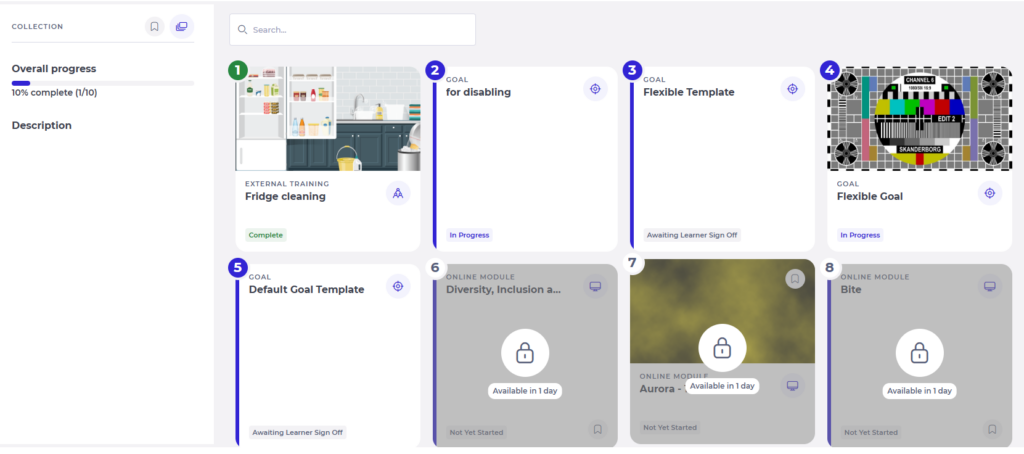
Flexible Goals

We have introduced Flexible Goals, allowing organisations to choose whether goals must be signed off and locked before progress tracking begins.

A new “Sign off” toggle is now available within Goal templates:

  • When enabled, goals must be signed off and are locked before progress tracking begins (current behaviour).
  • When disabled, progress tracking can begin immediately and objectives and tasks remain editable throughout the goal lifecycle.

Why this Matters

Previously, goals had to be signed off and locked before progress tracking could begin, and once locked, objectives and tasks could not be edited. This made it difficult to refine goals as priorities evolved.

Flexible Goals allow organisations to choose a more adaptable approach where goals can continue to evolve while progress is being tracked.

Key Benefits

  • Flexible goal editing: Learners and managers can update objectives and tasks throughout the goal lifecycle.
  • Configurable goal behaviour: Organisations can choose whether goals require sign-off and locking before progress tracking begins.
  • Collaborative goal management: Goals can be refined over time as work evolves.
  • Protected completed work: Objectives or tasks marked as 100% complete cannot be edited or deleted.

Training Calendar – Read-only access for Training Managers

We have introduced a new read-only permission for Training Managers within the Training Calendar.

Users with this permission can view training sessions without being able to create, edit, or delete them.

Only sessions marked as “Include in read only” will be visible, and access will respect existing branch visibility rules. This means users will only see sessions relevant to the branches they have access to.

Why this Matters

Some organisations require visibility of scheduled training without granting permission to manage calendar activity. This update allows oversight of upcoming sessions while maintaining control over who can make changes.

Key Benefits

  • Controlled calendar access: Users can view training sessions without being able to modify them.
  • Targeted session visibility: Read-only users will only see sessions marked as “Include in read only.”
  • Branch-aware viewing: The calendar view will respect existing branch visibility rules, ensuring users only see sessions relevant to the branches they have access to.


Insights – Configurable weekly email day

We have introduced the ability to configure which day of the week the Insights email is sent for each company.

The email is triggered in the morning of the selected day, allowing delivery to align with each organisation’s operational review cycle.

This setting is managed by Mapal and is not available directly within the platform. To update the delivery day, please contact your representative.

Why this Matters

Organisations review performance data at different points in the week. Configurable delivery ensures Insights emails arrive at the most relevant time.

Key Benefits

  • Company-level configuration: The delivery day for Insights emails can be set individually for each company.
  • Better alignment with operations: Insights can be delivered on the day that best fits each company’s reporting or review cycle.
  • No change to existing behaviour: The default delivery day will remain Tuesday unless updated.


Collections – Archived Noticeboard items removed

Archived Noticeboard items are now fully removed from Collections.

When a Noticeboard item is archived, it is no longer included in Collection templates or learner Collections.

Why this Matters

Previously, archived Noticeboard items could remain in Collections, affecting item counts and preventing completion.

Key Benefits

  • Accurate Collection counts: Archived items are excluded from totals.
  • No blocked completions: Learners can complete Collections without archived items interfering.
  • Consistent behaviour: Archived items are removed from templates and learner assignments.


Turn Videos into Interactive Learning Experiences

Video Simulation is now available, making it possible to transform videos into fully interactive training experiences. Simply upload or link to a video, and Mapal Studio will generate a simulation-style module automatically.

This is ideal for process training, system walkthroughs, and onboarding content that would typically take significant time to build manually.

Why this Matters

Interactive video simulations help bring content to life, making it easier for learners to engage with and retain key information.

Key Benefits

  1. Convert existing videos into interactive learning experiences
  2. Reduce time spent building simulations manually
  3. Improve learner engagement and knowledge retention
  4. Ideal for onboarding, compliance, and operational training 

Custom Agent Skills (Recipes)

It’s now possible to personalise how content is generated by creating Custom Agent Skills. These allow commonly used prompts, tone preferences, and content structures to be saved and reused automatically.

Once set up, Mapal Studio will apply these preferences whenever new content is generated.

Why this Matters

Consistency in tone and structure is key when creating learning at scale. Custom Skills help standardise content while reducing repetitive input.

Key Benefits

  1. Save and reuse preferred prompts and content styles
  2. Ensure consistency across all learning materials
  3. Reduce the need to repeat instructions each time
  4. Align content with your organisation’s standards

Flow Learning Release - 26.03.2026


Job Title Filtering for Challenges

A new Job Title filter has been added to Challenge configuration, allowing Challenges to be targeted to specific job titles.

When one or more job titles are selected, only learners with matching job titles will be able to see and access the Challenge. 

This works alongside existing filters such as brand and availability dates.

Why this Matters

Challenges can now be aligned more closely to relevant roles, helping ensure learners are presented with content that is appropriate to them. This supports a more tailored and engaging learning experience.

Key Benefits

  • Targeted visibility: Challenges are displayed only to learners with relevant job titles.
  • Improved relevance: Learners are presented with content aligned to their role.
  • Flexible configuration: Job Title filtering works alongside existing brand and date settings.

Improved Collection Behaviour for Brand-Filtered Challenges

We now ensure that when a Challenge becomes unavailable due to brand filter updates, it is removed from learner Collections and no longer impacts completion.

Why this Matters

Previously, Challenges that became unavailable due to brand changes were hidden from learners but still counted towards Collection completion.

This could result in learners being unable to complete a Collection due to items they could no longer access.

Key Benefits

  • Accurate Collection structure: Item counts now reflect only accessible Challenges.
  • Reliable completion logic: Hidden Challenges no longer count towards Collection completion.
  • Unblocked completion: Learners can complete Collections without being held up by inaccessible Challenges.


SCORM Modules – Restricted assignment controls

We now support marking SCORM modules as Restricted, along with new permissions to control who can assign them.

Restricted modules can only be assigned by users with the appropriate permission and are hidden from other users in Assign Learning.

Why this Matters

Some SCORM modules are subject to licensing or usage limits and require controlled distribution.

Previously, all modules could be assigned by any user with access, making it difficult to manage restricted or paid content appropriately.

Key Benefits

  • Controlled distribution: Restricted modules can only be assigned by authorised users.
  • Improved governance: Licensed content is managed more securely.
  • Clear visibility rules: Restricted modules are hidden from users without permission in Assign Learning.


Reporting Levels – OS category group updates

We now ensure that when category group names are updated in OS, the corresponding reporting level names in Flow are updated automatically.

Why this Matters

Previously, updates to category group names in OS were not reflected in Flow, resulting in inconsistencies between platforms.

Reporting is now aligned across systems, supporting clearer data interpretation.

Key Benefits

  • Consistent naming: Reporting level names remain aligned between OS and Flow.
  • Improved clarity: Reporting reflects the latest category group structure.
  • Reduced manual effort: No need to manage or reconcile naming differences across systems.

Emails – Improved French localisation

We now ensure that attendance statuses and date formats are displayed correctly in French across system emails.

Attendance types such as booked and cancelled are now translated where applicable, and dates no longer include English suffixes.

Why this Matters

Previously, some emails included untranslated attendance statuses or English date formatting.

This update ensures a more consistent and fully localised experience for French users.

Key Benefits

  • Improved localisation: Attendance statuses are displayed in the correct language.
  • Consistent formatting: Dates are presented without English suffixes.
  • Enhanced clarity: Emails reflect a fully localised experience.

Mapal One Release - 26.03.2026

Big and bold additions to the product.
New functionality that changes what you can do.


Flow / Engagement – Explore Learning – Share Learning Items via Chat

Employees can now share learning content from Explore Learning directly through Chat. A Share icon will appear on learning item tiles, enabling Employees to quickly recommend useful training to colleagues. When selecting the Share icon, Employees will be able to choose recipients and send the learning item through Chat with a link to access the content.

Why this matters
Employees often discover valuable training within Explore Learning but have no simple way to recommend it to colleagues. Adding sharing will make learning more collaborative and encourage knowledge sharing across teams.

Key benefits

Behaviour summary


Engagement – Priority Messages

Mapal One now can show a Priority Messages, allowing Employees to receive and view urgent communications directly within the app. These messages will appear immediately on screen to ensure important updates are not missed.

Priority Messages will be used for time-sensitive information, such as operational changes, urgent notices, or important business updates.

Why this matters
Businesses occasionally need to communicate urgent information to Employees quickly. Important updates can be missed or delayed. Priority Messages will provide a clear and immediate way to notify Employees about critical updates.

Key benefits

Behaviour summary


Engagement – Improve Visibility of Surveys and Polls

Mapal One has enhanced how Surveys and Polls are displayed across the platform to ensure Employees can easily discover and respond to Polls.

Polls will become more visible in several key areas of the experience. When a Poll is assigned to an Employee, it will appear in the “Required by You” section and the main Dashboard carousel, helping Employees quickly identify items that require their response.  Within the Surveys and Polls page, both content types will also be displayed more evenly so Employees can immediately see available Surveys and Polls without needing to scroll or switch sections.

Why this matters

Polls are already available in Mapal One, but their visibility was limited. Employees may not always realise that new Polls are available, which can reduce participation and engagement. By surfacing Polls in key areas of the Dashboard and improving how Surveys and Polls appear within the Engagement page, Employees will more easily discover items that require their attention.

Key benefits


Small changes, big impact.
Quick wins inspired directly by your feedback.


Workforce – View Current and Future Holiday Preferences

Employees will now be able to view both current and future Holiday Preferences within the Shift & Absences ? Preferences section. This improvement will make it easier for Employees to understand what preferences they have submitted and when those preferences apply.

Holiday Preferences will also be displayed using a clearer layout aligned with the Assigned tab design, helping Employees quickly recognise the relevant week and year.

Why this matters
Previously, Holiday Preferences only display entries for the current holiday year. This means Employees cannot see preferences that have already been submitted for future holiday periods, which can create uncertainty about whether their requests were recorded.

By showing both current and future preferences in a clearer format, Employees will have better visibility of their holiday planning.

Key benefits


Refinements that make things smoother and better.
Performance, usability and quality upgrades.


Engagement – Anonymous Evaluations Visibility

Mapal One will clearly indicate when an evaluation is anonymous within the Evaluations section, helping Employees understand whether their feedback will be shared anonymously.

Why this matters
Currently, there is no clear indication when an evaluation is anonymous, which can create uncertainty for Employees when submitting feedback.

Key benefits