Refinements that make things smoother and better. Performance, usability and quality upgrades.
Staff on Shift – Employee List Pagination
Mapal Manager now supports pagination within Staff on Shift, allowing Managers to navigate through larger Employee and Business Unit lists more easily.
Employee and Business Unit lists now load in pages of 25 items, with pagination controls always visible at the bottom of the page. Summary tiles continue to reflect the full result set, and moving between pages automatically returns the Manager to the top of the list for a smoother experience.
Why this matters This improvement provides better visibility of Employees currently on shift, especially in larger organisations with high volumes of data.
Key benefits
Improved visibility: Managers can now access the full list of Employees and Business Units.
Easier navigation: Pagination controls make larger data sets easier to browse.
Consistent experience: Pagination follows the same style and behaviour used on the Absences page.
Better usability: Returning to the top of the page after navigation creates a smoother experience.
** Please Note:These features were released on the 28.05.2026. Availability on iOS may take up to 24 hours due to Apple’s review process and will require the app to be updated to the latest version, v2.3.0.
Mapal Manager Release - 19.05.2026
Features & Enhancements
Big and bold additions to the product. New functionality that changes what you can do.
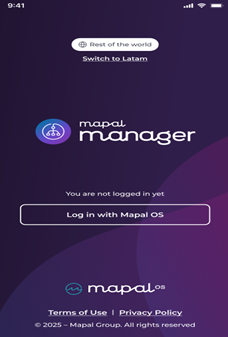
Latam / Rest of the World - Login – Region Selection Before Sign In
Mapal Manager now allows Managers to select their region before logging in, Latam or Rest of World.The selected region will ensure Managers are connected to the correct login, services, and regional environment. Rest of World will be selected by default.
Why this matters Mapal Manager needs to support different regional services. Allowing Managers to choose their region before login will ensure they are routed correctly and can access the right services for their location.
Key benefits
Correct regional access: Managers will be connected to the right services based on their selected region.
Clear login experience: Region selection will happen before sign in.
Flexible support: Mapal Manager will support both Latam and Rest of World configurations.
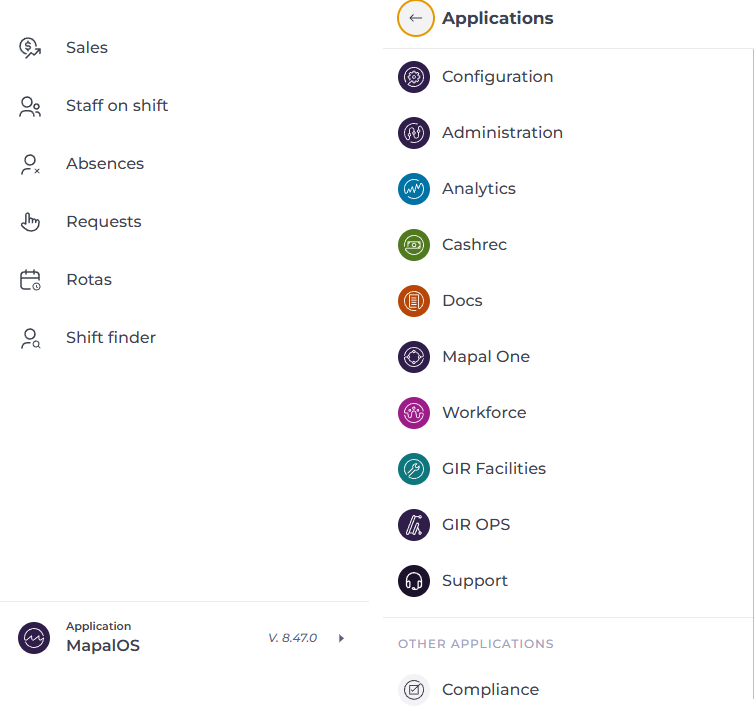
Navigation – Global Product Switcher
Mapal Manager has introduced a new global product switcher, allowing Managers to move more easily between available Mapal products and support resources from a single location. The updated switcher will automatically display the products and services available to each Manager based on their access permissions.
Why this matters Managers often work across multiple Mapal products and services. Introducing a shared product switcher will create a more connected experience and make navigation between products simpler and more consistent.
Key benefits
Easier navigation: Managers will be able to switch between available Mapal products more quickly.
Personalised access: The switcher will only display products the Manager can access.
Improved support access: Managers will be able to navigate to support resources more easily.
** Please Note:These features were released on the 19/05/2026. Availability on iOS may take up to 24 hours due to Apple’s review process. Users will also need to upgrade their app to the latest version.
Mapal Manager Release - 30.04.2026
Features & Enhancements
Big and bold additions to the product. New functionality that changes what you can do.
AI – Upgrade to Latest Version Mapal Manager was upgraded to use the latest version of the AI component, enabling access to new capabilities and improvements. This update supported enhancements such as document upload and search, while ensuring existing AI functionality continued to work as expected.
Why this matters Updating to the latest AI version allowed Mapal Manager to benefit from ongoing improvements and new features. This ensured Employees had access to the most up-to-date AI capabilities.
Key benefits • Access to new features: Employees benefited from enhancements such as document upload and search • Improved performance: The latest version included updates and optimisations • Future-ready: Mapal Manager stayed aligned with ongoing AI development • No disruption: Existing AI functionality continued to work as expected
Golden Nuggets
Small changes, big impact. Quick wins inspired directly by your feedback.
Requests – Default Sorting and Pending View Mapal Manager applied a default date-based sort order to the Requests page, ensuring items were displayed in a logical and consistent way. Requests were sorted by the most recent dates first, and the page defaulted to showing pending items when opened.
Why this matters Previously, the Requests page did not always display items in a clear or consistent order. This made it harder for Managers to identify recent activity and prioritise actions. Applying a default sort and focusing on pending items improved clarity and efficiency.
Key benefits • Clear prioritisation: The most recent requests appear first • Faster action: Pending requests are visible by default • Consistent behaviour: Sorting remains the same across page loads • Improved usability: Managers can quickly understand and act on requests
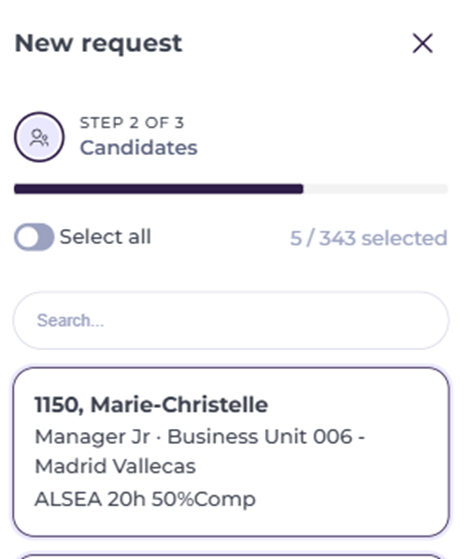
Shift Finder – Candidate Selection Progress Mapal Manager displayed the number of selected candidates alongside the total number of available candidates when creating a Shift Finder request. This gave Managers clearer visibility of their selection progress during the process.
Why this matters Previously, Managers could only see how many candidates had been selected, without context of the total available. This made it harder to understand progress and the size of the candidate pool.
Key benefits • Clear progress tracking: Managers see selected candidates against the total available • Better context: The size of the candidate pool is immediately visible • Improved decision-making: Managers can make more informed selections • Dynamic updates: Counts update as candidates are selected or removed
Improvements
Refinements that make things smoother and better. Performance, usability and quality upgrades.
Mapal Manager – Web Access Landing Page Mapal Manager introduced a dedicated landing page when accessed through a web browser, guiding Managers to download the mobile app instead. The page clearly explained that Mapal Manager is designed for mobile use and provided direct links to the Apple App Store and Google Play Store.
Why this matters Mapal Manager is designed for mobile and tablet use, but it could previously be accessed through a web browser. This created confusion and could lead to a poor experience on an unsupported device. Adding a dedicated landing page provided Managers with a clearer and more effective way to access the app correctly.
Key benefits • Clear guidance: Managers are directed to the correct way to access Mapal Manager • Better experience: Unsupported browser access no longer leads to a confusing experience • Easy download path: The landing page provides direct links to both app stores • Stronger product clarity: Mapal Manager is clearly positioned as a mobile-first experience
** Please Note:These features were released on the 30/04/2026. Availability on iOS may take up to 24 hours due to Apple’s review process.