Optimize Smart Grammage rules using recipe categories
If your environment is configured for multiple languages, the multilingual icon appears for some fields. For more information on how to use it, see the article Use Easilys in multilingual mode .
Start from: The Easilys menu.
Using recipe categories and subcategories
A recipe category, as its name suggests, allows you to categorize recipes, to group them together in the same group. The recipe subcategory further refines this categorization.
The benefit of this categorization is, first of all, to be able to filter your recipe list.
Example: If you are looking for a dessert recipe sheet, use the Recipe Category filter by checking only the Dessert category. You will then have, on the screen, only the recipe sheets attached to this category.
Finally, recipe categories and subcategories can be a criterion for applying a rule of Smart Selection, Smart Grammage, Smart Packaging, Smart Catalogue, or smart particularity.
Using Smart Grammage
If your environment is configured for multiple languages, the multilingual icon
appears for some fields. For more information on how to use it, see the article
Use Easilys in multilingual mode
.
Start from: The Easilys menu.
In the main menu, select Recipes > Smart Grammage.
Select Create.
A blank Smart Grammage form window appears.
Enter the following information:
You can enter a name OR skip this step (the tool will autocomplete the label).
Choose whether you want to indicate the variation as a fixed weight or as a percentage. For a percentage variation, you must then select
"reference" if the percentage variation should be based on the default weight of the recipe.
"specified per guest/service" if the percentage variation should be based on the specific weights per guest and service
Note: The fixed weight option is more precise.
Select the application criteria for the rule.
Select Save.
Note: A Smart Grammage rule applies to recipes available for use on the site for which it is created. The rule is inherited by child sites, but it only applies to recipes available for use on the site for which it was created.
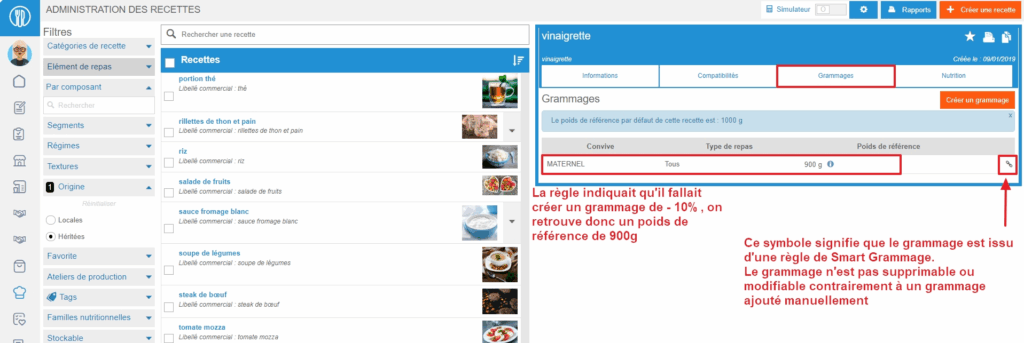
Note: When the weight of a recipe comes from the application of a Smart Grammage rule, the "Chain" icon highlights it in the list of specific weights for the recipe. This weight cannot then be modified from the recipe.
Example: If site A has a rule of -10% of the reference weight for starters for "Elderly people" guests, then the rule also applies to its child sites A1 and A2. Site A1 has created a starter recipe, so it is not available on site A, and the Smart Grammage rule does not apply to this local recipe.?