Mapal One Release - 16.07.2026

Summary

This release adds Engagement custom labels for clearer, organisation-aligned terminology, and refines French translations across Workforce areas to improve clarity and consistency.

Note: These features were released on 16.07.2026. Availability on iOS may take up to 24 hours due to Apple’s review process and requires updating the app to the latest version.
Enhancements

Engagement Custom Labels

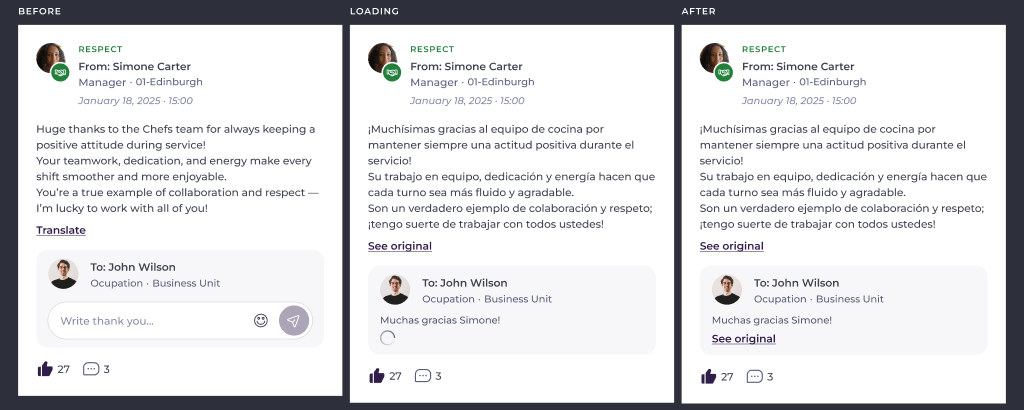
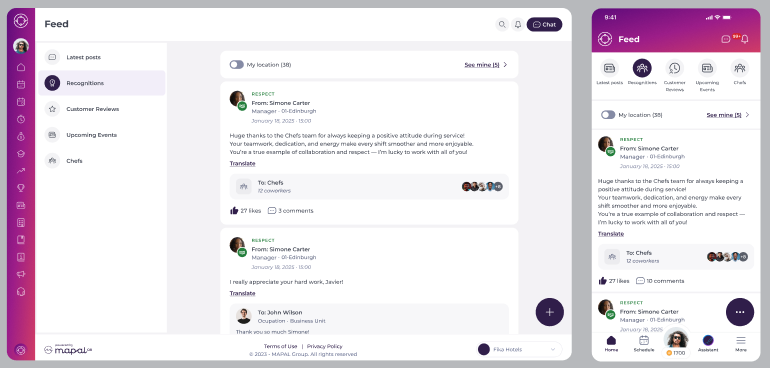
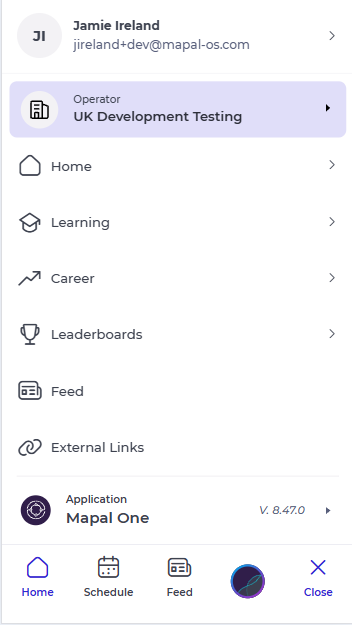
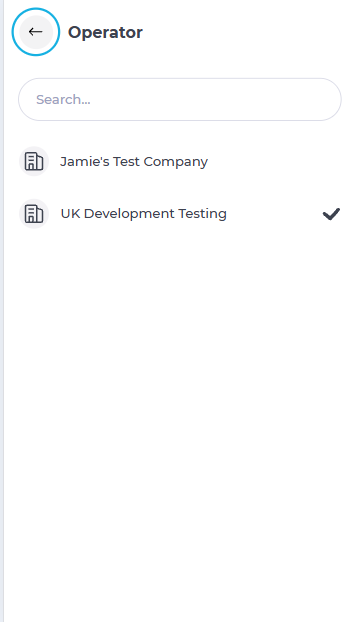
Mapal One now supports Engagement custom labels, helping organisations apply their agreed terminology more consistently across key Engagement areas such as navigation and recognitions.

Why this matters

When system wording matches the language an organisation already uses, it becomes easier for people to understand information and move through the product with confidence.

Key benefits

Improvements

French Translation Corrections

We improved French translations across Workforce areas in Mapal One to make wording clearer and more consistent.

Why this matters

Clear and accurate language helps employees understand actions, labels, and information more easily, creating a smoother day-to-day experience.

Key benefits

Mapal Manager Release - 11.06.2026


Issues we have resolved.
Fixes to improve stability and reliability.


Workforce – Unit Visibility

We improved how Units are displayed across Mapal Manager. Managers will now see a more complete and consistent view of their Units across Staff on Shift, Absences, and Rotas.

Why this matters
Having a consistent view of all Units helps Managers access the right teams and information more easily, improving visibility across key workforce areas.


** Please Note: These features were released on the 11.06.2026. Availability on iOS may take up to 24 hours due to Apple’s review process and will require the app to be updated to the latest version.

Mapal Manager Release - 28.05.2026


Refinements that make things smoother and better.
Performance, usability and quality upgrades.


Staff on Shift – Employee List Pagination

Mapal Manager now supports pagination within Staff on Shift, allowing Managers to navigate through larger Employee and Business Unit lists more easily.

Employee and Business Unit lists now load in pages of 25 items, with pagination controls always visible at the bottom of the page. Summary tiles continue to reflect the full result set, and moving between pages automatically returns the Manager to the top of the list for a smoother experience.

Why this matters
This improvement provides better visibility of Employees currently on shift, especially in larger organisations with high volumes of data.

Key benefits


** Please Note: These features were released on the 28.05.2026. Availability on iOS may take up to 24 hours due to Apple’s review process and will require the app to be updated to the latest version, v2.3.0.

Mapal Manager Release - 19.05.2026

Big and bold additions to the product.
New functionality that changes what you can do.


Latam / Rest of the World - Login – Region Selection Before Sign In

Mapal Manager now allows Managers to select their region before logging in, Latam or Rest of World.The selected region will ensure Managers are connected to the correct login, services, and regional environment. Rest of World will be selected by default.

Why this matters
Mapal Manager needs to support different regional services. Allowing Managers to choose their region before login will ensure they are routed correctly and can access the right services for their location.

Key benefits


Navigation – Global Product Switcher

Mapal Manager has introduced a new global product switcher, allowing Managers to move more easily between available Mapal products and support resources from a single location. The updated switcher will automatically display the products and services available to each Manager based on their access permissions.

Why this matters
Managers often work across multiple Mapal products and services. Introducing a shared product switcher will create a more connected experience and make navigation between products simpler and more consistent.

Key benefits


** Please Note: These features were released on the 19/05/2026. Availability on iOS may take up to 24 hours due to Apple’s review process. Users will also need to upgrade their app to the latest version.

Mapal One Release - 19.05.2026

Big and bold additions to the product.
New functionality that changes what you can do.


Supporting Latam Region - Login – Region Selection Before Sign In

Mapal One now allows Employees to select their region before logging in, the options are Latam or Rest of World. The selected region will ensure Employees are connected to the correct login, services, and regional environment. Rest of World will be selected by default.

Why this matters
Mapal One needs to support different regional services. Allowing Employees to choose their region before login will ensure they are routed correctly and can access the right services for their location.

Key benefits


Refinements that make things smoother and better.
Performance, usability and quality upgrades.


Workforce – Improved Holiday Settings Support

Mapal One now respects additional Holiday settings configured in Workforce, ensuring Employees only see the holiday information and options relevant to their organisation’s setup. This improvement extends support beyond the main Holidays setting and applies the configured visibility rules more consistently across the experience.

Why this matters
This update expands support for Holiday configuration settings within Workforce, allowing Mapal One to deliver a more personalised and consistent experience for Employees across holiday-related areas.

Key benefits


Learning – Visibility Based on Access Settings

Mapal One will only display the Learning section to Employees who have access to Flow-enabled learning functionality. Employees without Flow access will no longer see the Learning section in navigation or be able to access Learning pages directly.

Why this matters
This improvement ensures the navigation experience remains relevant and focused for each Employee. By only displaying Learning features where they are available, Mapal One will provide a cleaner and more personalised experience.

Key benefits


Workforce – Improved QR Code Clock-In Security

Mapal One now has a timed expiry to QR code clock-in and clock-out actions, helping ensure attendance records remain accurate and up to date. If a QR action is not completed within the allowed time, Employees will be required to re-scan the QR code before continuing.

Why this matters
Accurate attendance records are important for workforce visibility, reporting, and day-to-day operations. Applying an expiry window to QR code actions helps ensure clocking activity is recorded reliably and reflects real-time attendance behaviour.

Key benefits


** Please Note: These features were released on the 19/05/2026. Availability on iOS may take up to 24 hours due to Apple’s review process.  Users will also need to ensure they update the app to the latest version.

Mapal Manager Release - 30.04.2026

Big and bold additions to the product.
New functionality that changes what you can do.


AI – Upgrade to Latest Version
Mapal Manager was upgraded to use the latest version of the AI component, enabling access to new capabilities and improvements.
This update supported enhancements such as document upload and search, while ensuring existing AI functionality continued to work as expected.

Why this matters
Updating to the latest AI version allowed Mapal Manager to benefit from ongoing improvements and new features. This ensured Employees had access to the most up-to-date AI capabilities.

Key benefits
• Access to new features: Employees benefited from enhancements such as document upload and search
• Improved performance: The latest version included updates and optimisations
• Future-ready: Mapal Manager stayed aligned with ongoing AI development
• No disruption: Existing AI functionality continued to work as expected


Small changes, big impact.
Quick wins inspired directly by your feedback.


Requests – Default Sorting and Pending View
Mapal Manager applied a default date-based sort order to the Requests page, ensuring items were displayed in a logical and consistent way.
Requests were sorted by the most recent dates first, and the page defaulted to showing pending items when opened.

Why this matters
Previously, the Requests page did not always display items in a clear or consistent order. This made it harder for Managers to identify recent activity and prioritise actions. Applying a default sort and focusing on pending items improved clarity and efficiency.

Key benefits
• Clear prioritisation: The most recent requests appear first
• Faster action: Pending requests are visible by default
• Consistent behaviour: Sorting remains the same across page loads
• Improved usability: Managers can quickly understand and act on requests


Shift Finder – Candidate Selection Progress
Mapal Manager displayed the number of selected candidates alongside the total number of available candidates when creating a Shift Finder request.
This gave Managers clearer visibility of their selection progress during the process.

Why this matters
Previously, Managers could only see how many candidates had been selected, without context of the total available. This made it harder to understand progress and the size of the candidate pool.

Key benefits
• Clear progress tracking: Managers see selected candidates against the total available
• Better context: The size of the candidate pool is immediately visible
• Improved decision-making: Managers can make more informed selections
• Dynamic updates: Counts update as candidates are selected or removed


Refinements that make things smoother and better.
Performance, usability and quality upgrades.


Mapal Manager – Web Access Landing Page
Mapal Manager introduced a dedicated landing page when accessed through a web browser, guiding Managers to download the mobile app instead.
The page clearly explained that Mapal Manager is designed for mobile use and provided direct links to the Apple App Store and Google Play Store.

Why this matters
Mapal Manager is designed for mobile and tablet use, but it could previously be accessed through a web browser. This created confusion and could lead to a poor experience on an unsupported device. Adding a dedicated landing page provided Managers with a clearer and more effective way to access the app correctly.

Key benefits
• Clear guidance: Managers are directed to the correct way to access Mapal Manager
• Better experience: Unsupported browser access no longer leads to a confusing experience
• Easy download path: The landing page provides direct links to both app stores
• Stronger product clarity: Mapal Manager is clearly positioned as a mobile-first experience


** Please Note: These features were released on the 30/04/2026. Availability on iOS may take up to 24 hours due to Apple’s review process.

Mapal One Release - 30.04.2026

Big and bold additions to the product.
New functionality that changes what you can do.


AI – Upgrade to Latest Version
Mapal One was upgraded to use the latest version of the AI component, enabling access to new capabilities and improvements.
This update supports enhancements such as document upload and search, while ensuring existing AI functionality continues to work as expected.

Why this matters
Updating to the latest AI version allows Mapal One to benefit from ongoing improvements and new features. This ensures Employees have access to the most up-to-date AI capabilities.

Key benefits
• Access to new features: Employees benefit from enhancements such as document upload and search
• Improved performance: The latest version includes updates and optimisations
• Future-ready: Mapal One stays aligned with ongoing AI development
• No disruption: Existing AI functionality continues to work as expected


Evaluations – Hide Scores When Disabled
Mapal One hid all scoring information in Evaluations when scoring was disabled. When an evaluation was configured without scores, Employees saw results without any score-related details.

Why this matters
Some evaluations are intended to focus on completion rather than scoring. Previously, scoring information could still be displayed, which created confusion and did not reflect the intended configuration. This update ensures evaluations are presented correctly.

Key benefits
• Clear presentation: Evaluations display results without scores when configured
• Consistent behaviour: All evaluation views respect the scoring setting
• Improved clarity: Employees see only relevant information based on the evaluation type
• Flexible configuration: Supports different evaluation styles without impacting the experience


Engagement – View Likes on Comments
Mapal One allowed Employees to see who has liked a comment on a post. This aligned the behaviour with how likes are displayed on posts.
Employees can now view the list of colleagues who have liked a comment, providing clearer visibility of engagement within discussions.

Why this matters
Previously, Employees could see who liked a post, but not who liked a comment. This inconsistency caused confusion and limited visibility within conversations. Aligning this behaviour created a more consistent and transparent experience.

Key benefits
• Improved visibility: Employees can see who has liked a comment
• Consistent behaviour: Comment likes follow the same interaction as post likes
• Better engagement awareness: Employees better understand participation within discussions


Refinements that make things smoother and better.
Performance, usability and quality upgrades.


Workforce – Consistent Behaviour for Shifts and Holidays Settings
Mapal One ensured that the application consistently respected the Shifts and Holidays settings across the Schedule and all related areas. Employees only saw shift and holiday information when those features were enabled for them.
When either setting was disabled, the system removed the related information and actions while keeping the overall Schedule visible for other content.

Why this matters
Previously, the behaviour of Shifts and Holidays settings was not always consistent. In some cases, information could still appear or areas could behave unexpectedly when a setting was disabled. This created confusion and made the application feel unreliable.
This enhancement ensures the experience is clear, predictable, and aligned with how settings are intended to work.

Key benefits
• Consistent experience: Shifts and Holidays only appear when enabled
• Reduced confusion: Employees do not see irrelevant or unavailable features
• Clear system behaviour: Settings behave predictably across all areas
• Cleaner interface: Unavailable actions and sections are removed when not applicable


Issues we have resolved.
Fixes to improve stability and reliability.


Engagement – Posts – File Deletion Behaviour
Fixed an issue where deleting an attached file triggered an unexpected download before removal.
Files are now removed directly without opening a new tab.


** Please Note: These features were released on the 30/04/2026. Availability on iOS may take up to 24 hours due to Apple’s review process.

Mapal One Release - 16.04.2026

Big and bold additions to the product.
New functionality that changes what you can do.


Goals – Flexible Goals Editing & Progress
Mapal One will allow Employees to edit flexible goals while tracking progress. Employees will be able to update objectives, tasks, and progress at the same time, without restrictions.
Flexible goals will not require locking or sign-off, allowing Employees to continuously refine their goals throughout the process.

Why this matters
Currently, some goals may become restricted once progress tracking begins, making it harder for Employees to update or refine their objectives. Flexible goals will remove these limitations and provide a more adaptable experience.
Key benefits:


Evaluations – Add Comments to Self-Assessment Scores
Mapal One will allow Employees to add a comment when completing self-assessment scores within the Evaluations section. A text field will be available alongside scoring options, enabling Employees to explain the reasoning behind their selected score.
The comment will be saved as part of the evaluation and will be visible to Managers during review.

Why this matters
Currently, Employees can provide scores but cannot explain the reasoning behind them. This can make it difficult for Managers to fully understand the context of a self-assessment. Adding comments will improve the quality of feedback and support more meaningful evaluation discussions.
Key benefits:

  • Better context: Employees will be able to explain the reasoning behind their scores.
  • More informed reviews: Managers will have clearer insight when reviewing evaluations.
  • Improved feedback quality: Evaluations will include both scores and supporting comments
  • Consistent experience: Comments will be displayed alongside scores during review.


Behaviour summary:

  • A text field will be added below scoring options in the self-assessment section.
  • The field will be available for relevant question types (such as single choice and satisfaction questions).
  • Employees will be able to enter comments up to a defined character limit.
  • Comments will be saved as part of the evaluation response.
  • Managers will be able to view comments alongside scores during review.
  • Once submitted, comments will be viewable in read-only format.
  • The existing scoring logic and evaluation workflow will remain unchanged.

Small changes, big impact.
Quick wins inspired directly by your feedback.


Explore Learning – Role-Based Content on Dashboard

Mapal One will filter Explore Learning items on the Dashboard based on the Employee’s job role, ensuring that displayed content is relevant to their responsibilities.

The same filtering logic already used within the Explore Learning section will now be applied to Dashboard content for a more consistent experience.

Why this matters
Currently, learning content on the Dashboard may not reflect an Employee’s role, even though filtering is applied within the Explore Learning section. This inconsistency can reduce relevance and create confusion.

Key benefits

Refinements that make things smoother and better.
Performance, usability and quality upgrades.


iOS – Location Permission Messaging Update

Mapal One will include a clear message explaining why location access may be requested on iOS devices. This ensures the app meets Apple’s requirements for transparency when accessing device features.

Why this matters
Apple requires apps to clearly explain why certain permissions, such as location access, may be requested. Without this message, future app updates may be rejected, even if location services are not actively used.  This is required for our expansion into LATAM.

Key benefits


Issues we have resolved.
Fixes to improve stability and reliability.


External Links – Image Cropping Issue

Fixed an issue where images selected and cropped in Flow for External Links were being further cropped when displayed in Mapal One.

Images will now display exactly as configured, without additional cropping.

Login – Repeated Sync Error Messages

Fixed an issue where error messages related to Flow or Engagement sync were repeatedly displayed to Employees, eventually causing the session to time out.

The error will now display once, allowing the Employee to continue using Mapal One where access is available.


** Please Note: These features were released on the 16/04/2026. Availability on iOS may take up to 24 hours due to Apple’s review process.

Mapal One Release - 26.03.2026

Big and bold additions to the product.
New functionality that changes what you can do.


Flow / Engagement – Explore Learning – Share Learning Items via Chat

Employees can now share learning content from Explore Learning directly through Chat. A Share icon will appear on learning item tiles, enabling Employees to quickly recommend useful training to colleagues. When selecting the Share icon, Employees will be able to choose recipients and send the learning item through Chat with a link to access the content.

Why this matters
Employees often discover valuable training within Explore Learning but have no simple way to recommend it to colleagues. Adding sharing will make learning more collaborative and encourage knowledge sharing across teams.

Key benefits

Behaviour summary


Engagement – Priority Messages

Mapal One now can show a Priority Messages, allowing Employees to receive and view urgent communications directly within the app. These messages will appear immediately on screen to ensure important updates are not missed.

Priority Messages will be used for time-sensitive information, such as operational changes, urgent notices, or important business updates.

Why this matters
Businesses occasionally need to communicate urgent information to Employees quickly. Important updates can be missed or delayed. Priority Messages will provide a clear and immediate way to notify Employees about critical updates.

Key benefits

Behaviour summary


Engagement – Improve Visibility of Surveys and Polls

Mapal One has enhanced how Surveys and Polls are displayed across the platform to ensure Employees can easily discover and respond to Polls.

Polls will become more visible in several key areas of the experience. When a Poll is assigned to an Employee, it will appear in the “Required by You” section and the main Dashboard carousel, helping Employees quickly identify items that require their response.  Within the Surveys and Polls page, both content types will also be displayed more evenly so Employees can immediately see available Surveys and Polls without needing to scroll or switch sections.

Why this matters

Polls are already available in Mapal One, but their visibility was limited. Employees may not always realise that new Polls are available, which can reduce participation and engagement. By surfacing Polls in key areas of the Dashboard and improving how Surveys and Polls appear within the Engagement page, Employees will more easily discover items that require their attention.

Key benefits


Small changes, big impact.
Quick wins inspired directly by your feedback.


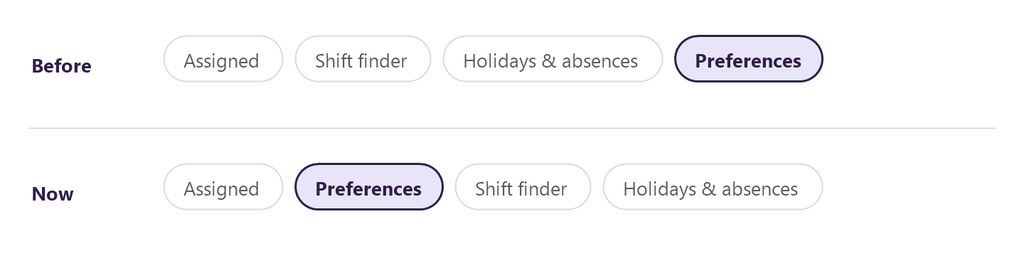
Workforce – View Current and Future Holiday Preferences

Employees will now be able to view both current and future Holiday Preferences within the Shift & Absences ? Preferences section. This improvement will make it easier for Employees to understand what preferences they have submitted and when those preferences apply.

Holiday Preferences will also be displayed using a clearer layout aligned with the Assigned tab design, helping Employees quickly recognise the relevant week and year.

Why this matters
Previously, Holiday Preferences only display entries for the current holiday year. This means Employees cannot see preferences that have already been submitted for future holiday periods, which can create uncertainty about whether their requests were recorded.

By showing both current and future preferences in a clearer format, Employees will have better visibility of their holiday planning.

Key benefits


Refinements that make things smoother and better.
Performance, usability and quality upgrades.


Engagement – Anonymous Evaluations Visibility

Mapal One will clearly indicate when an evaluation is anonymous within the Evaluations section, helping Employees understand whether their feedback will be shared anonymously.

Why this matters
Currently, there is no clear indication when an evaluation is anonymous, which can create uncertainty for Employees when submitting feedback.

Key benefits


Mapal One Release - 12.03.2026

Big and bold additions to the product.
New functionality that changes what you can do.


Engagement - Chat – Search Within a Conversation

Mapal One has introduced the ability for Employees to search within an individual chat conversation. A Search icon has been added to the Chat Detail view, allowing Employees to quickly locate specific messages without manually scrolling through long conversations.

Selecting the Search icon will open the conversation in Search mode, where Employees can enter a keyword and navigate between matched results.

Why this matters
Previously, Employees had to manually scroll through chat conversations to find specific messages. In longer chats, this could be time-consuming and frustrating. Adding a dedicated search function will make it significantly easier to locate valuable information.

Key benefits


Workforce - Absences – Improved Date Validation Messaging

Mapal One now provides clearer feedback when an Employee selects an invalid date range while submitting an absence request. If the end date is earlier than the start date, the system will display a clear error message explaining that the selected date range is invalid.

To further prevent errors, once a start date is selected, the “To” date picker will only allow valid future dates. Dates before the selected start date will not be selectable.

Why this matters
When an Employee selects an end date before the start date, the system blocks submission but does not clearly explain why. This can cause confusion and slow down the absence request process. Improving validation messaging will make the experience clearer and more intuitive.

Key benefits


Workforce – Updated Clock in Icon

Mapal One has updated the Clock In icon to a “stop-watch” icon to better represent time tracking functionality. The icon has been replaced to improve clarity and maintain consistency across products.

The updated icon is applied consistently across all relevant areas, including the Main Menu, Time and Attendance, Worked Time, and breadcrumb navigation.

Why this matters
The previous icon does not clearly represent time tracking and may cause confusion. Updating to a stop-watch icon provides a clearer visual cue and improves consistency across Mapal products.

Key benefits


Mapal One – Updated Main Menu Icon

Mapal One has updated the main menu icon to a burger-style icon to align with standard navigation patterns. The previous “9 dot” icon will be with a more recognisable menu symbol.

The icon styling has also been updated to align with current design standards.

Why this matters
The menu icon could be ambiguous and less recognisable as a navigation control. Updating to a burger-style icon improves familiarity and ensures clearer navigation across mobile and web experiences.

Key benefits


Small changes, big impact.
Quick wins inspired directly by your feedback.


Engagement - Communications – Preserve Scroll Position

Mapal One now preserves the scroll position within the Communications feed when an Employee opens a forum or news post and then navigates back. The feed will return to the same position within the current session, allowing Employees to continue browsing without interruption.

Scroll position will reset only after a full-page refresh.

Why this matters
When an Employee opens a forum or news post and then returns to the Communications feed, the page resets to the top. This disrupts browsing and forces Employees to scroll down again to find their previous place. In longer feeds, this creates unnecessary friction and interrupts the browsing experience.

Key benefits