Problemas resueltos. Mejoras destinadas a aumentar la estabilidad y la fiabilidad.
Workforce – Visibilidad de Unidades
Hemos mejorado la forma en que se muestran las Unidades en Mapal Manager. Los Managers ahora disponen de una vista más completa y coherente de sus Unidades en Staff on Shift, Ausencias y Rotas.
Por qué es importante Contar con una visión consistente de todas las Unidades ayuda a los Managers a acceder más fácilmente a los equipos y a la información correcta, mejorando la visibilidad en áreas clave de gestión de personal.
Por favor, tenga en cuenta: Estas funcionalidades fueron publicadas el 11.06.2026. La disponibilidad en iOS puede tardar hasta 24 horas debido al proceso de revisión de Apple y será necesario actualizar la aplicación a la última versión.
Lanzamiento de Mapal Manager - 28.05.2026
Mejoras
Mejoras que hacen la experiencia más fluida y eficiente. Optimización del rendimiento, la usabilidad y la calidad.
Staff on Shift – Paginación de la lista de Empleados
Mapal Manager ahora admite paginación en Staff on Shift, permitiendo a los Managers navegar más fácilmente por listas grandes de Empleados y Unidades de negocio.
Las listas de Empleados y Unidades de negocio ahora se cargan en grupos de 25 elementos, con controles de paginación siempre visibles en la parte inferior de la página. Los paneles resumen continúan reflejando el conjunto completo de resultados y, al cambiar de página, el Manager volverá automáticamente al inicio de la lista para una experiencia más fluida.
Por qué es importante Esta mejora proporciona una mayor visibilidad de los Empleados actualmente en turno, especialmente en organizaciones con grandes volúmenes de información.
Beneficios clave
Mayor visibilidad: Los Managers ahora pueden acceder a la lista completa de Empleados y Unidades de negocio.
Navegación más sencilla: Los controles de paginación facilitan la navegación en grandes conjuntos de datos.
Experiencia consistente: La paginación sigue el mismo estilo y comportamiento utilizado en la página de Ausencias.
Mejor usabilidad: Volver automáticamente al inicio de la página mejora la experiencia de navegación.
Por favor, tenga en cuenta: Estas funcionalidades fueron publicadas el 28.05.2026. La disponibilidad en iOS puede tardar hasta 24 horas debido al proceso de revisión de Apple y será necesario actualizar la aplicación a la última versión, v2.3.0.
Lanzamiento de Mapal Manager - 19.05.2026
Funciones y mejoras
Nuevas funcionalidades importantes Nuevas funcionalidades que amplían lo que puedes hacer.
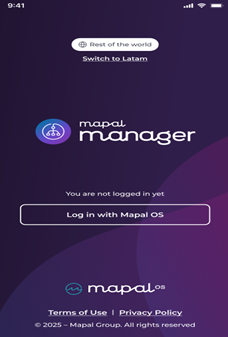
Latam / Resto del Mundo – Inicio de sesión: selección de región antes de iniciar sesión
Mapal Manager ahora permite a los Managers seleccionar su región antes de iniciar sesión, pudiendo elegir entre Latam o Resto del Mundo. La región seleccionada garantizará que los Managers se conecten al inicio de sesión, servicios y entorno regional correctos. Resto del Mundo estará seleccionado por defecto.
Por qué es importante Mapal Manager necesita dar soporte a diferentes servicios regionales. Permitir que los Managers seleccionen su región antes de iniciar sesión garantizará que sean dirigidos correctamente y puedan acceder a los servicios adecuados para su ubicación.
Beneficios clave
Acceso regional correcto: Los Managers se conectarán a los servicios adecuados según la región seleccionada.
Experiencia de inicio de sesión más clara: La selección de región se realizará antes de iniciar sesión.
Soporte flexible: Mapal Manager será compatible tanto con configuraciones de Latam como de Resto del Mundo.
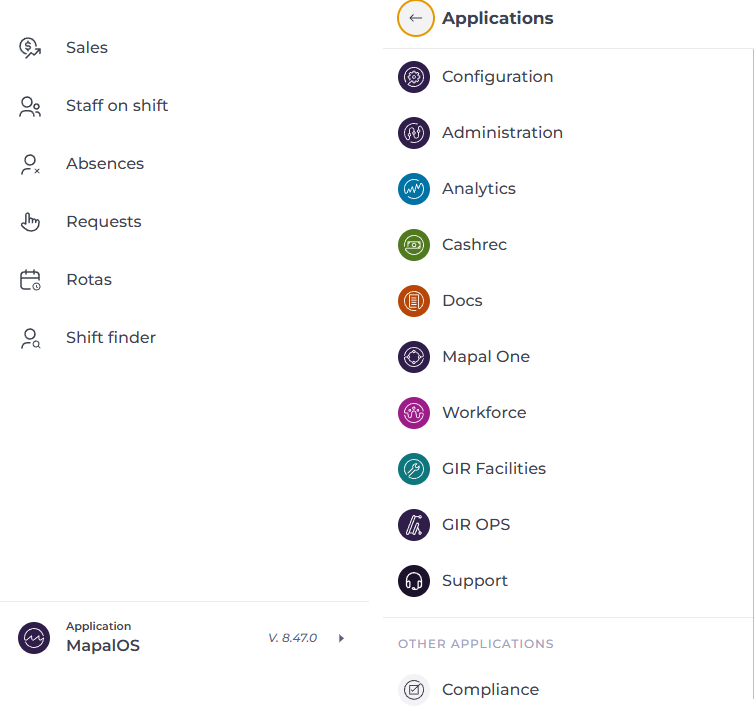
Navegación – Selector global de productos
Mapal Manager ha introducido un nuevo selector global de productos, permitiendo a los Managers moverse más fácilmente entre los productos Mapal disponibles y los recursos de soporte desde una única ubicación. El nuevo selector mostrará automáticamente los productos y servicios disponibles para cada Manager según sus permisos de acceso.
Por qué es importante Los Managers suelen trabajar con varios productos y servicios de Mapal. Introducir un selector de productos compartido creará una experiencia más conectada y hará que la navegación entre productos sea más sencilla y consistente.
Beneficios clave
Navegación más sencilla: Los Managers podrán cambiar más rápidamente entre los productos Mapal disponibles.
Acceso personalizado: El selector solo mostrará los productos a los que el Manager tenga acceso.
Mejor acceso al soporte: Los Managers podrán acceder más fácilmente a los recursos de soporte.
Nota: Estas funcionalidades se han publicado el 19/05/2026. Su disponibilidad en iOS puede tardar hasta 24 horas debido al proceso de revisión de Apple.
Lanzamiento de Mapal Manager-30.04.2026
Funciones y mejoras
Nuevas funcionalidades importantes Nuevas funcionalidades que amplían lo que puedes hacer.
AI – Actualización a la última versión Mapal Manager se actualizó para utilizar la última versión del componente de AI, lo que permitió acceder a nuevas capacidades y mejoras. Esta actualización incorporó mejoras como la carga y búsqueda de documentos, garantizando al mismo tiempo que la funcionalidad existente de AI continuara funcionando correctamente.
Por qué es importante Actualizar a la última versión de AI permitió a Mapal Manager beneficiarse de mejoras continuas y nuevas funcionalidades. Esto garantizó que los empleados tuvieran acceso a las capacidades de AI más actualizadas.
Beneficios clave • Acceso a nuevas funcionalidades: los empleados se beneficiaron de mejoras como la carga y búsqueda de documentos • Mejora del rendimiento: la última versión incluyó actualizaciones y optimizaciones • Preparado para el futuro: Mapal Manager se mantuvo alineado con la evolución continua de la AI • Sin interrupciones: la funcionalidad existente de AI continuó funcionando correctamente
Mejoras clave
Pequeños cambios, gran impacto. Mejoras rápidas inspiradas directamente en tus comentarios.
Solicitudes – Ordenación por defecto y vista de pendientes Mapal Manager aplicó una ordenación por fecha por defecto en la página de Solicitudes, garantizando que los elementos se mostraran de forma lógica y consistente. Las solicitudes se ordenaban por las fechas más recientes primero, y la página mostraba por defecto los elementos pendientes al abrirse.
Por qué es importante Anteriormente, la página de Solicitudes no siempre mostraba los elementos de forma clara o consistente. Esto dificultaba que los managers identificaran la actividad reciente y priorizaran acciones. Aplicar una ordenación por defecto y centrarse en los elementos pendientes mejoró la claridad y la eficiencia.
Beneficios clave • Priorización clara: las solicitudes más recientes aparecen primero • Acción más rápida: las solicitudes pendientes son visibles por defecto • Comportamiento consistente: la ordenación se mantiene entre cargas de página • Mejor usabilidad: los managers pueden comprender y gestionar rápidamente las solicitudes
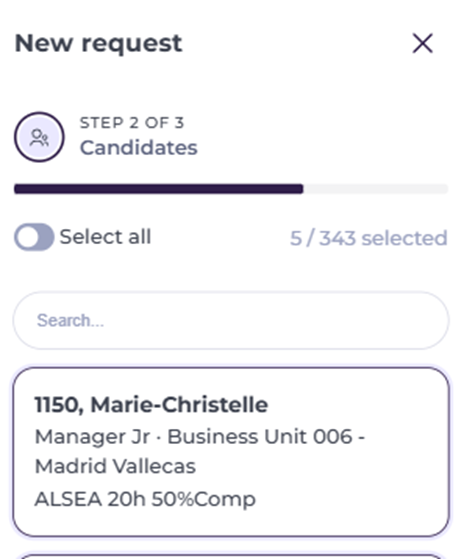
Shift Finder – Progreso en la selección de candidatos Mapal Manager mostró el número de candidatos seleccionados junto con el número total de candidatos disponibles al crear una solicitud de Shift Finder. Esto proporcionó a los managers una mayor visibilidad del progreso de su selección durante el proceso.
Por qué es importante Anteriormente, los managers solo podían ver cuántos candidatos habían sido seleccionados, sin contexto sobre el total disponible. Esto dificultaba entender el progreso y el tamaño del grupo de candidatos.
Beneficios clave • Seguimiento claro del progreso: los managers ven los candidatos seleccionados frente al total disponible • Mejor contexto: el tamaño del grupo de candidatos es visible de inmediato • Mejora en la toma de decisiones: los managers pueden realizar selecciones más informadas • Actualización dinámica: los conteos se actualizan al seleccionar o eliminar candidatos
Mejoras
Mejoras que hacen la experiencia más fluida y eficiente. Optimización del rendimiento, la usabilidad y la calidad.
Mapal Manager – Página de acceso web Mapal Manager introdujo una página de acceso dedicada cuando se accedía a través de un navegador web, guiando a los managers a descargar la aplicación móvil en su lugar. La página explicaba claramente que Mapal Manager está diseñado para uso móvil y proporcionaba enlaces directos a Apple App Store y Google Play Store.
Por qué es importante Mapal Manager está diseñado para su uso en móvil y tablet, pero anteriormente podía accederse a través de un navegador web. Esto generaba confusión y podía provocar una mala experiencia en dispositivos no compatibles. La incorporación de una página de acceso dedicada ofreció a los managers una forma más clara y adecuada de acceder a la aplicación.
Beneficios clave • Orientación clara: los managers son dirigidos a la forma correcta de acceder a Mapal Manager • Mejor experiencia: el acceso desde navegador no compatible ya no genera confusión • Descarga sencilla: la página proporciona enlaces directos a ambas tiendas • Mayor claridad del producto: Mapal Manager se posiciona claramente como una experiencia centrada en móvil
Nota: Estas funcionalidades se han publicado el 30/04/2026. Su disponibilidad en iOS puede tardar hasta 24 horas debido al proceso de revisión de Apple.