


Start from: The Easilys menu.
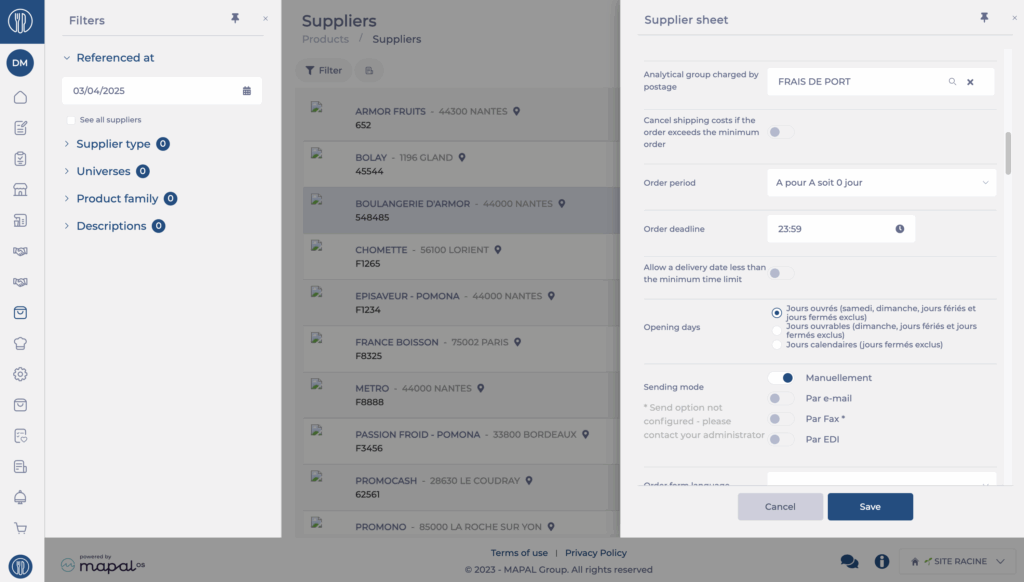
Entering the deadline and order cutoff time allows Easilys to know until what time an order can be sent to the supplier according to the expected delivery date. However, it is possible to relax this rule by activating the option Allow a delivery date less than the minimum deadline. In this case, the order outside the deadline will be flagged to you but you can still validate it.
Note: Even when activating the option Allow a delivery date less than the minimum deadline, it remains impossible to send an order, even manually, if the delivery date is a past date.
The order deadline takes into account the opening days configuration. Thus, if your supplier works on business days, Saturday, Sunday as well as holidays and closed days will be excluded from the calculation.
Example: If you have an order deadline of 2 days and you try to send your order on Friday for the following Monday, this action will be impossible if the supplier is configured for business days. If it is configured for calendar days, then it will be quite possible to send the order, because you will then be three days before the desired delivery date.
The cutoff time is also important: if you respect the order deadline, but not the order cutoff time, then sending will be impossible.
Example: If you have an order deadline of one day and an order cutoff time at 12pm and you try to send the order on Thursday at 2pm for the next day, this will not be possible. You must send the order before noon.
