Point de départ : Le menu Easilys.
It is possible to print claims and credit note requests to send to suppliers from an exit voucher. If you have enabled automatic sending of claims and credit note requests on the supplier file, you then do not have to perform the sending procedure yourself.
PRINT A CLAIM OR SUPPLIER CREDIT NOTE REQUEST
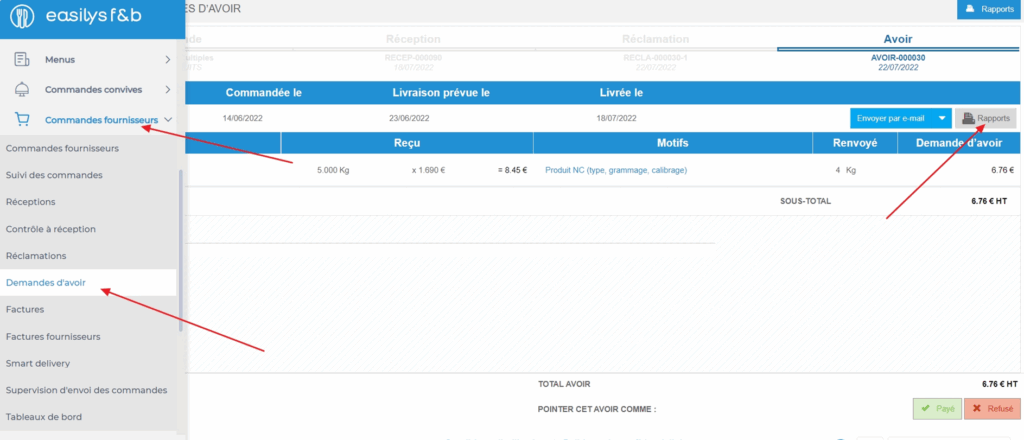
- Select the tabs Supplier orders > Claims or Supplier orders > Credit note requests and select the claim or credit note request that you want to print and/or send.
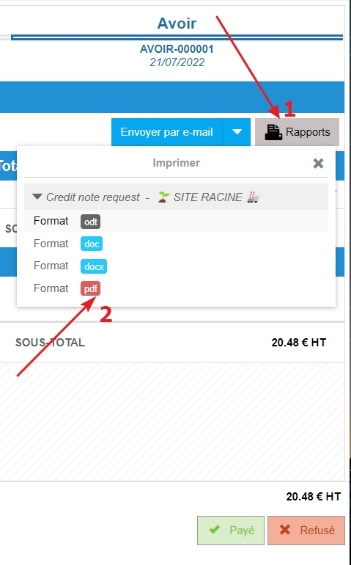
- To print, select Reports or the printer-shaped icon available in the claim or credit note request voucher on the right of the screen.
A "Print" window appears on the screen to allow you to choose the file format.
SEND A CLAIM OR SUPPLIER CREDIT NOTE REQUEST
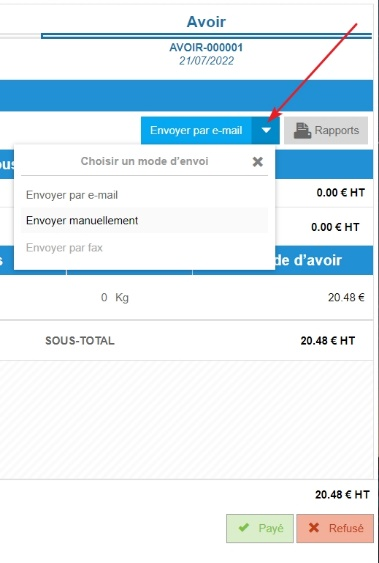
- To send a claim or credit note request to the supplier, select Send available in the claim or credit note request voucher on the right of the screen.
- You can also choose the sending method if several are available by selecting the small white arrow of the button.