


Start from: the Mapal OS dashboard.
Jump to a topic:
- Sync time between OS and Flow Learning
- Managing users
- User profiles
- Job Titles & Departments
- Troubleshooting with Feed Logs
- Similar records
Sync time between OS and Flow Learning
It usually takes up to 15 minutes for data to sync between OS Configuration and Flow Learning.
Managing users
User information for all Mapal OS customers is available in both OS Configuration and Flow Learning. For those with integrations, you do not need to manage or maintain this information as it automatically pulls through from your integrated platform. If an email has not been updated from your HR integration to Mapal OS, please push an update on your HR system again and then check the feed logs in Mapal OS.
When user information is synchronised, existing SSO identifiers are updated rather than duplicated, keeping identifiers aligned between systems.
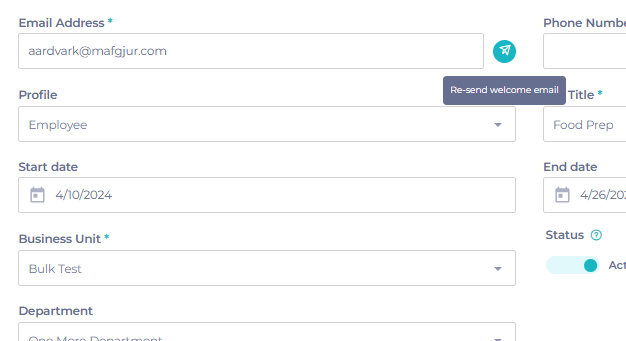
Re-sending welcome emails
You may need to re-send welcome emails to your learners, if they are having trouble accessing the system.
- Navigate to User Management > Users.
- Search for the user in question and click into their profile.
- Beside their email address, select the paper airplane icon to generate a new welcome email.
User profiles
User profiles will already be setup for you when you first access the system. These pre-loaded user profiles should be configured to match the variety of permissions your users currently enjoy. Initially, all your users will be given"employee" status, with Mapal One access.
Training manager job titles
The Training Manager job titles feature in Flow allows learners to be automatically promoted to training managers if they are assigned a relevant job title (configured within Company > User Settings).
For OS source customers, this feature remains available in Flow, but users are not automatically updated with the relevant profile in Mapal OS.
Managing training manager profiles
If you have a manager who requires different access, you will need to link that user record with a user profile.
- Navigate to User Management > Users and select the relevant user record.
- Select the appropriate user profile from the available list.
For more information on managing user profiles in OS Configuration, read Manage user profiles in Mapal OS.
Flow Learning users should should also check Set permissions for training managers for essential information on how to enable OS for Flow.
Job Titles & Departments
All new job titles or departments should now be created in Mapal OS configuration. You can add these individually, or you can use a batch process.
Follow these guides to add new job titles and departments:
Connecting job titles to training structures
When new job titles have been synced to Flow Learning, you will need to assign the training structure to ensure your learners receive the correct resources.
- Visit Company > Job Titles.
- Select the relevant learner from the list to bring up Edit Job Title.
- From the Training structure dropdown, choose the best option.
Note: Job titles and/or departments must match exactly with what is set up in your HR/Payroll system. This includes capitalisation and spacing to ensure accurate syncing.
Troubleshooting with Feed Logs
Feed logs within Mapal OS can help to identify errors caused by problems with integrations.
If you manage users through the Integration API, the Create/Update User endpoint now supports Business Unit access and global access flags, with access defined as all business units, specific business units, or departments.
Note: The Get Business Units endpoint returns all Business Unit lifecycle statuses, not only Active and Inactive. The userFeedId and application Capabilities fields are no longer returned in API responses.
- Navigate to User management > Feed Logs.
Note: the job titles and/or departments should match exactly between HR/Payroll system and Mapal - this includes capital letters and spacing.
Common errors from Feed Logs
- Employee with external Identifier {external ID} not processed, Job Title with name {Job Title} does not exist - this indicates that the Job Title does not exist on your platform and is preventing successful import. Job Titles can be managed via Business Management > Job Titles
- Unable to add user to Department, Department with name {Department} does not exist - this indicates that the Department does not exist on your platform and this information is missing from the imported record. Departments can be managed via Business Management > Departments
- Unable to add user to Business Unit, Business Unit with Feed id {Business Unit Feed ID} does not exist - this indicates that the Business Unit identifier is incorrect. These can be managed via Business Management > Business Units.
- Employee with external Identifier {External Identifier} not processed. Another Employee is already assigned to the same User - this indicates that there is an existing employee/user record on the system with this external ID. The external ID can be updated for the existing record by going to Employees Management > Employees and updating the external ID field.
- Duplicate key error - appears when we receive a new employee record with the same email address as an existing one on the platform (active/linked to a user).
Similar records
There are a few things to bear in mind when it comes to importing similar records:
- External IDs should be unique for every employee. If two employees are imported with the same external ID, you will find one employee record set up on Mapal - in other words, the first record will be overwritten with the second.
- A new employee record with the same email address as an existing record will import - providing that the original user record has previously been deactivated.
Note: External IDs are controlled by 3rd party systems, and the exact relationship between ID and employee can differ depending on the system.
Next steps
For more on how to get the most from Mapal OS, check out our other guides on OS Configuration.
If you are having issues, but no errors are appearing within the feed, contact [email protected].
Our Onboarding Team will also be hosting extra webinars on OS Configuration - book a place now to get involved.
