


Features & Enhancements
Big and bold additions to the product.
New functionality that changes what you can do.
Engagement - Chat – Search Within a Conversation
Mapal One has introduced the ability for Employees to search within an individual chat conversation. A Search icon has been added to the Chat Detail view, allowing Employees to quickly locate specific messages without manually scrolling through long conversations.
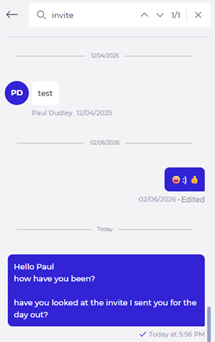
Selecting the Search icon will open the conversation in Search mode, where Employees can enter a keyword and navigate between matched results.
Why this matters
Previously, Employees had to manually scroll through chat conversations to find specific messages. In longer chats, this could be time-consuming and frustrating. Adding a dedicated search function will make it significantly easier to locate valuable information.
Key benefits
- Faster message retrieval: Employees will be able to quickly search within a conversation.
- Clear navigation: Up and down arrows will allow Employees to move between search results.
- Visible match tracking: The number of matches and current position (for example, 2/8) will be displayed.
- Focused search experience: The message entry field will be hidden in Search mode and replaced with a search bar for clarity.
- Improved visibility: Matched messages will be briefly highlighted to make them easy to identify.
Workforce - Absences – Improved Date Validation Messaging
Mapal One now provides clearer feedback when an Employee selects an invalid date range while submitting an absence request. If the end date is earlier than the start date, the system will display a clear error message explaining that the selected date range is invalid.
To further prevent errors, once a start date is selected, the “To” date picker will only allow valid future dates. Dates before the selected start date will not be selectable.
Why this matters
When an Employee selects an end date before the start date, the system blocks submission but does not clearly explain why. This can cause confusion and slow down the absence request process. Improving validation messaging will make the experience clearer and more intuitive.
Key benefits
- Clear feedback: Employees will understand immediately why a date range is invalid.
- Error prevention: The date picker will prevent selection of invalid end dates where possible.
- Reduced frustration: Fewer failed submissions due to unclear validation rules.
- Smoother submission process: Absence requests will be easier to complete correctly the first time.
Workforce – Updated Clock in Icon
Mapal One has updated the Clock In icon to a “stop-watch” icon to better represent time tracking functionality. The icon has been replaced to improve clarity and maintain consistency across products.
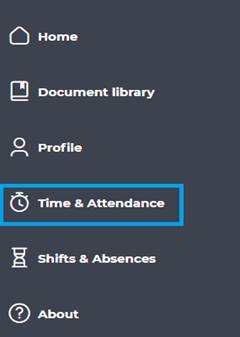
The updated icon is applied consistently across all relevant areas, including the Main Menu, Time and Attendance, Worked Time, and breadcrumb navigation.
Why this matters
The previous icon does not clearly represent time tracking and may cause confusion. Updating to a stop-watch icon provides a clearer visual cue and improves consistency across Mapal products.
Key benefits
- Clearer meaning: The new icon will more accurately represent time tracking.
- Improved consistency: Icon usage will align more closely across products.
- Better recognition: Employees will more easily associate the icon with Clock In functionality.
Mapal One – Updated Main Menu Icon
Mapal One has updated the main menu icon to a burger-style icon to align with standard navigation patterns. The previous “9 dot” icon will be with a more recognisable menu symbol.
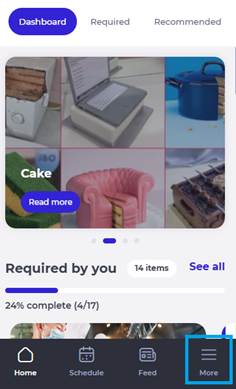
The icon styling has also been updated to align with current design standards.
Why this matters
The menu icon could be ambiguous and less recognisable as a navigation control. Updating to a burger-style icon improves familiarity and ensures clearer navigation across mobile and web experiences.
Key benefits
- Clear navigation: The menu icon will be instantly recognisable as a navigation control.
- Improved usability: Employees will find it easier to identify how to access the main menu.
- Design alignment: The icon and styling will follow common user interface patterns.
Golden Nuggets
Small changes, big impact.
Quick wins inspired directly by your feedback.
Engagement - Communications – Preserve Scroll Position
Mapal One now preserves the scroll position within the Communications feed when an Employee opens a forum or news post and then navigates back. The feed will return to the same position within the current session, allowing Employees to continue browsing without interruption.
Scroll position will reset only after a full-page refresh.
Why this matters
When an Employee opens a forum or news post and then returns to the Communications feed, the page resets to the top. This disrupts browsing and forces Employees to scroll down again to find their previous place. In longer feeds, this creates unnecessary friction and interrupts the browsing experience.
Key benefits
- Seamless browsing: Employees will return to the exact position they left in the feed.
- Reduced frustration: No need to repeatedly scroll back down after viewing a post.
- Consistent behaviour: This will apply across forum posts, news channels, and latest posts.
- Session-aware design: Scroll position will be preserved within the session and reset appropriately on refresh.
