


Features & Enhancements
Big and bold additions to the product.
New functionality that changes what you can do.
AI – Upgrade to Latest Version
Mapal One was upgraded to use the latest version of the AI component, enabling access to new capabilities and improvements.
This update supports enhancements such as document upload and search, while ensuring existing AI functionality continues to work as expected.
Why this matters
Updating to the latest AI version allows Mapal One to benefit from ongoing improvements and new features. This ensures Employees have access to the most up-to-date AI capabilities.
Key benefits
• Access to new features: Employees benefit from enhancements such as document upload and search
• Improved performance: The latest version includes updates and optimisations
• Future-ready: Mapal One stays aligned with ongoing AI development
• No disruption: Existing AI functionality continues to work as expected
Evaluations – Hide Scores When Disabled
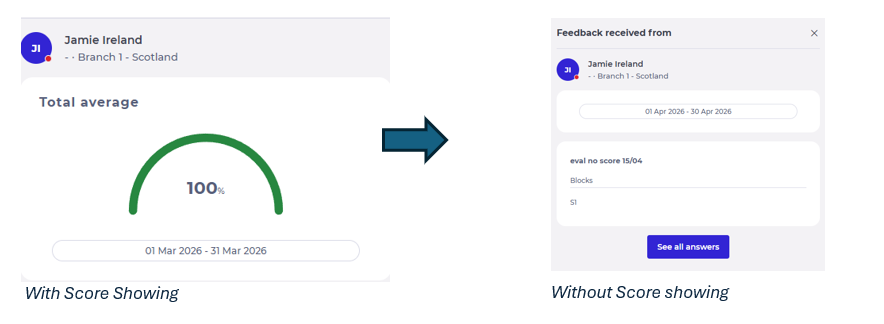
Mapal One hid all scoring information in Evaluations when scoring was disabled. When an evaluation was configured without scores, Employees saw results without any score-related details.
Why this matters
Some evaluations are intended to focus on completion rather than scoring. Previously, scoring information could still be displayed, which created confusion and did not reflect the intended configuration. This update ensures evaluations are presented correctly.
Key benefits
• Clear presentation: Evaluations display results without scores when configured
• Consistent behaviour: All evaluation views respect the scoring setting
• Improved clarity: Employees see only relevant information based on the evaluation type
• Flexible configuration: Supports different evaluation styles without impacting the experience
Engagement – View Likes on Comments
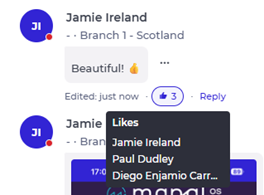
Mapal One allowed Employees to see who has liked a comment on a post. This aligned the behaviour with how likes are displayed on posts.
Employees can now view the list of colleagues who have liked a comment, providing clearer visibility of engagement within discussions.
Why this matters
Previously, Employees could see who liked a post, but not who liked a comment. This inconsistency caused confusion and limited visibility within conversations. Aligning this behaviour created a more consistent and transparent experience.
Key benefits
• Improved visibility: Employees can see who has liked a comment
• Consistent behaviour: Comment likes follow the same interaction as post likes
• Better engagement awareness: Employees better understand participation within discussions
Improvements
Refinements that make things smoother and better.
Performance, usability and quality upgrades.
Workforce – Consistent Behaviour for Shifts and Holidays Settings
Mapal One ensured that the application consistently respected the Shifts and Holidays settings across the Schedule and all related areas. Employees only saw shift and holiday information when those features were enabled for them.
When either setting was disabled, the system removed the related information and actions while keeping the overall Schedule visible for other content.
Why this matters
Previously, the behaviour of Shifts and Holidays settings was not always consistent. In some cases, information could still appear or areas could behave unexpectedly when a setting was disabled. This created confusion and made the application feel unreliable.
This enhancement ensures the experience is clear, predictable, and aligned with how settings are intended to work.
Key benefits
• Consistent experience: Shifts and Holidays only appear when enabled
• Reduced confusion: Employees do not see irrelevant or unavailable features
• Clear system behaviour: Settings behave predictably across all areas
• Cleaner interface: Unavailable actions and sections are removed when not applicable
Bug Fixes
Issues we have resolved.
Fixes to improve stability and reliability.
Engagement – Posts – File Deletion Behaviour
Fixed an issue where deleting an attached file triggered an unexpected download before removal.
Files are now removed directly without opening a new tab.
** Please Note: These features were released on the 30/04/2026. Availability on iOS may take up to 24 hours due to Apple’s review process.
