


Summary
This release introduces a new way to follow your suggestions, improves recognition and navigation responsiveness, adds Menu visibility controls for content, and brings a small but delightful dashboard touch. We also include targeted stability improvements and platform updates with no change to how the app works.
Enhancements
Suggestions Box – Follow every suggestion you send
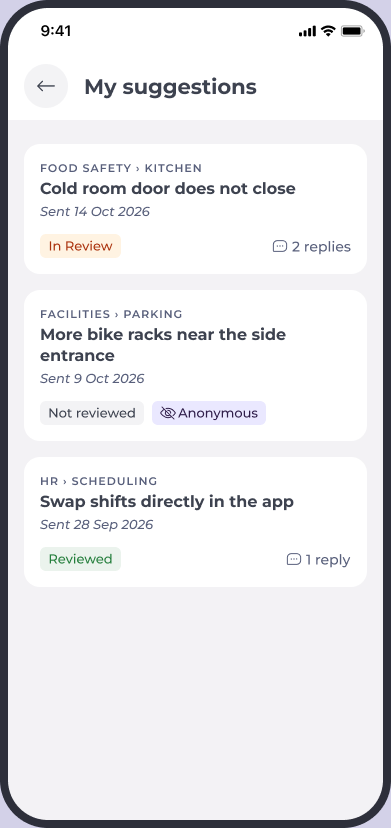
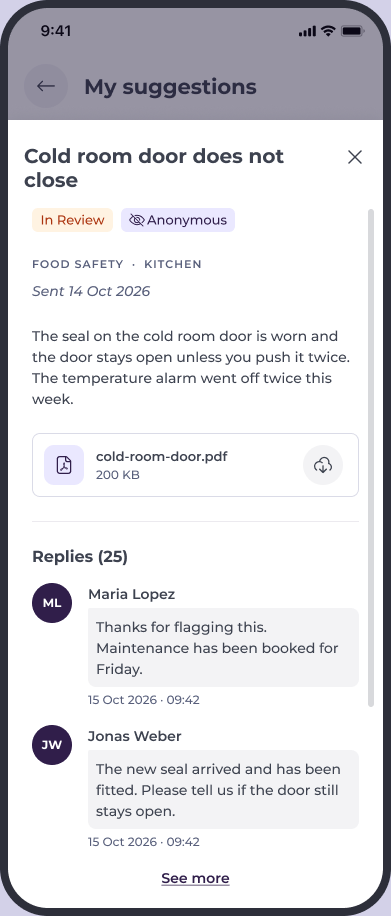
Colleagues now have a My suggestions list showing every suggestion they have sent, its current status, and all replies from administrators. Open a suggestion to read it in full with the conversation beneath.
Why this matters
Colleagues can see that their ideas are being heard and acted on, increasing transparency and engagement.
Key benefits
- Nothing disappears: Every suggestion in one place.
- Know where it stands: View the status at a glance.
- Read every reply: The full conversation is always available.
Recognitions – See your recognition straight away
Recognitions you send now appear instantly in the Recognition feed and in your Given list, without needing to refresh.
Why this matters
Recognising a colleague should feel immediate; instant visibility confirms it was sent.
Key benefits
- Instant feedback: Appears the moment you send it.
- No manual refresh: The feed and Given list update automatically.
Navigation – The right applications after switching operator
When switching operator, the applications shown in the Menu now refresh to match the selected operator, on web and mobile.
Why this matters
Colleagues who work across operators only see the applications relevant to where they are.
Key benefits
- Always the right Menu: Applications match the current operator.
- Consistent experience: Works the same on web and mobile.
Menu – Choose whether people see What's New and Knowledge Base
Companies can decide whether What's New and Knowledge Base appear in Mapal One. Use the Content Visibility setting per operator to show or hide both items. By default, Content Visibility is on and nothing changes.
Why this matters
Keep the Menu focused on the resources your teams should use, especially when you provide your own help and news.
Key benefits
- Your call: Show or hide both items per operator.
- One switch: Control both together.
- Safe default: On by default for no change unless you choose otherwise.
Dashboard – A well-earned "Well done!"
When a colleague completes all required training, the dashboard now shows a "Well done!" tile so it never appears blank.
Stability and fixes
We focused on improving reliability and expected behaviour in everyday workflows.
- Improved stability when writing and submitting comments in the Feed, especially for longer entries.
Behind the scenes
- Angular 21: The app now runs on the current supported version, with no changes to how it works.
- Shared services: Internal setup refinements to keep the app easier to maintain.
Availability note
Availability on iOS may take up to 24 hours due to Apple’s review process and requires updating the app to the latest version.
