


Summary
This release brings new translations in social and recognition flows, a unified operator switcher with a refreshed mobile menu, survey enhancements, and usability refinements across Shifts & Absences and Time & Attendance. It also includes stability improvements.
Enhancements
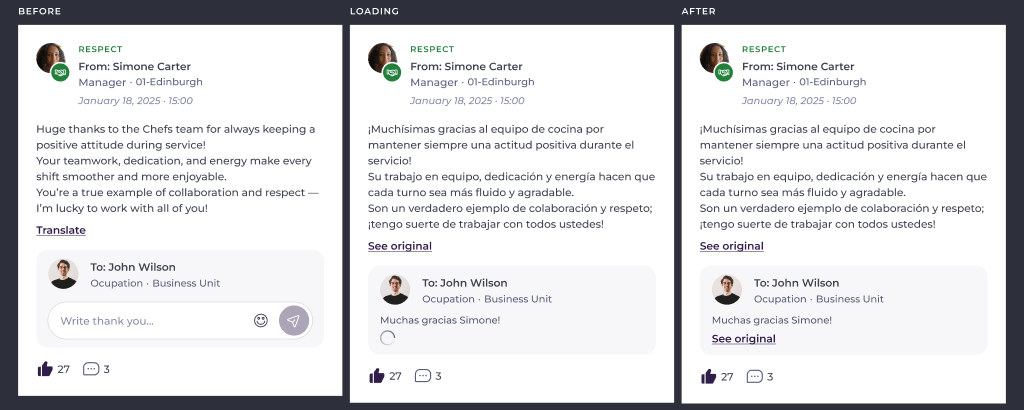
Translations – Read posts and recognitions in your language
Colleagues can translate posts, comments, replies, and recognition messages into the language they use in Mapal One, and switch back to the original at any time. Mentions remain intact.
Why this matters
Teams often work across multiple languages. Translation ensures everyone can follow conversations and recognition.
Key benefits
- Read posts, comments, replies, and recognitions in your own language.
- One-tap translate and one-tap switch back.
- Mentions preserved in translations.
Recognitions – Focus on your location
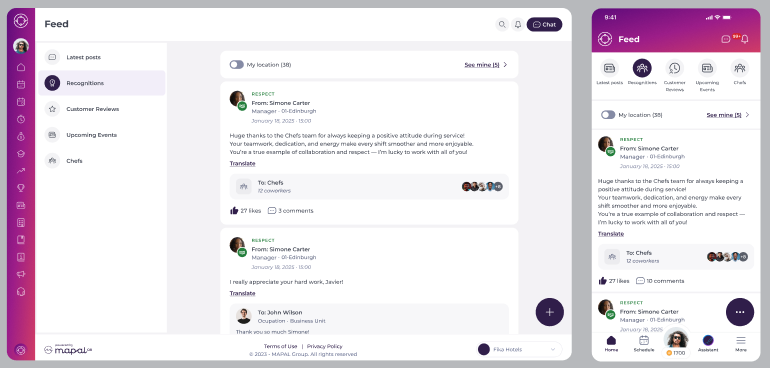
A new "My location" toggle on the recognitions timeline filters the view to recognitions from your location and shows the count.
Why this matters
In larger organisations, it is easier to focus on colleagues you work with day to day.
Key benefits
- See recognitions from your own location without extra scrolling.
- At-a-glance count for your location.
- Easily switch back to the full organisation view.
Navigation – Unified operator switcher and refreshed mobile menu
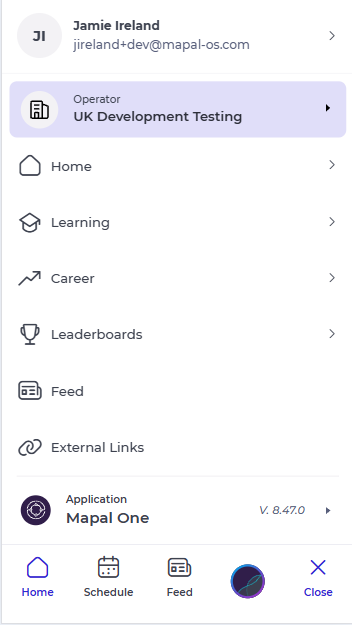
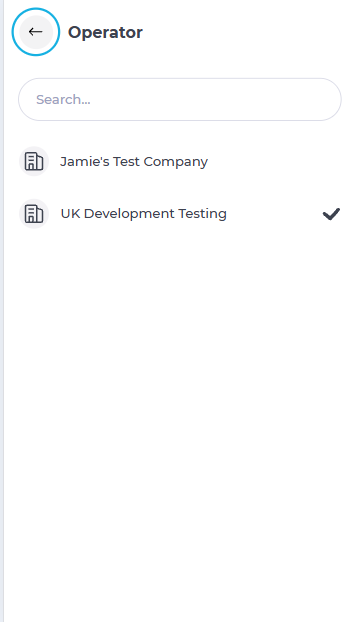
Mapal One now uses the same operator switcher as other Mapal products on web and mobile. The switcher opens a searchable list and clearly shows the current operator. On mobile, the menu design is updated, with the operator shown at the top and Profile moved into the account menu alongside About, What's New, Knowledge Base, Support, and Log out.
Why this matters
A consistent switcher across Mapal products makes moving between operators faster and more familiar.
Key benefits
- One consistent operator switcher across Mapal.
- Current operator clearly visible for every colleague.
- Searchable operator list for quick switching.
- Refreshed mobile menu aligned with the rest of Mapal.
Improvements
Surveys – New 1–5 number rating
Push surveys can include a simple 1–5 number rating question, answered with a single tap.

Why this matters
Creators can now ask for a plain score that is easy to compare over time, alongside the smiley-face rating.
Key benefits
- More flexible question types.
- Fast, single-tap responses.
Surveys – Smoother from start to finish
If loading or sending answers fails, colleagues see a clear message with a retry action and their answers are preserved. Completed surveys disappear from "Required by you" immediately.
Why this matters
Connectivity issues should not cause lost work, and completed tasks should clear right away.
Key benefits
- Clear status messages and retry options.
- Answers are kept if sending fails.
- Completed surveys are removed immediately.
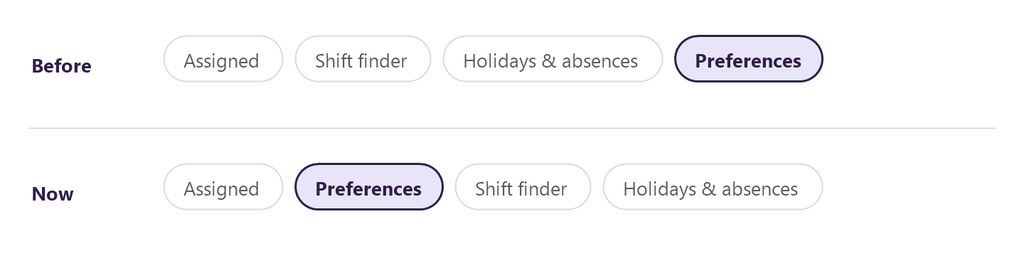
Shifts & Absences – Preferences moved up
Preferences now appears as the second tab, next to Assigned, making it quicker to reach.
Why this matters
Colleagues adjust preferences frequently; the new position reduces taps.
Key benefits
- Faster access with fewer steps.
Time & Attendance – Consistent header
The Time & Attendance page now uses the same header as other main pages. Back navigation and the Chat button behave consistently on mobile.
Why this matters
Consistency across pages improves ease of use and reduces confusion.
Key benefits
- Aligned layout and navigation.
- Correct Chat button display on mobile.
Golden Nuggets
Feed – Longer comments
Comment length increases to 1,000 characters, up from 250, so full replies fit in one comment.
Recognitions – Fewer taps to give recognition
The plus button on the Recognitions page now opens the Give Recognition form directly.
Career Mapping – Clear 5-star scores
Job role scores display filled and outline stars for quick, at-a-glance understanding.
Stability and fixes
We focused on improving visibility and access handling for Time & Attendance so that it appears only for colleagues who have it enabled.
Note: Availability on iOS may take up to 24 hours due to Apple’s review process and will require updating the app to the latest version.
