Note: Each action performed in the application is subject to access permissions. If you are unable to carry out the recommended actions in the articles you are viewing, this may mean that the necessary rights have not been activated for your user profile. Contact the Support team, or your administrator, to find out more.
Start from: Products > Suppliers
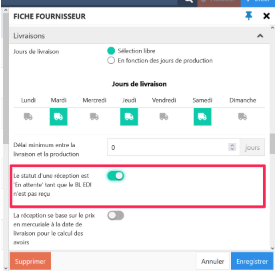
Point de départ : Le menu Easilys.?Cette option présente dans la partie LIVRAISON de la fiche fournisseur (onglets Produits > Fournisseurs) doit être activée uniquement si le mode d'envoi EDI est activé.
"A reception status is 'Pending' until the EDI delivery note is received" allows you to force the wait in "Pending delivery" status of the reception voucher on the RECEPTIONS screen until the EDI delivery note has been received by Easilys. That is, until the supplier software has not sent confirmation of the delivery note to Easilys.
?N'activez pas cette option si vous n'utilisez pas le système EDI pour les commandes. Cela bloquerait éternellement vos réceptions en statut "En attente de livraison" sur l'écran RÉCEPTIONS et vous ne pourriez donc pas les valider pour faire les entrées en stock. La seule solution serait de faire appel à l'équipe technique pour débloquer vos réceptions.