


Start from: The SmartHub app.
Authorized user authentication
Registering an employee is a Restricted Access action and is only possible if the necessary permissions have been assigned from GIR to the user.
To perform this action, users are required to re-authenticate themselves in Smarthub. Depending on the hardware, they will encounter various methods of identification, including:
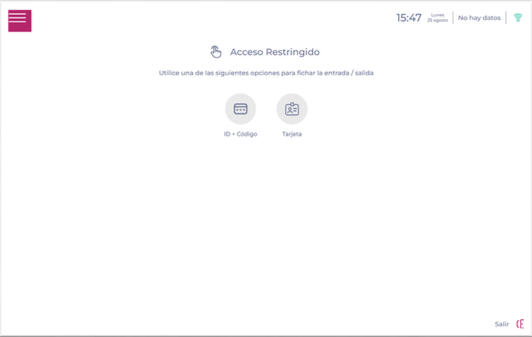
- Employee ID + Access Code: Enter your Employee ID and Access Code in the field.
Note: If an error appears when entering the Access Code on the device, it may be due to the center not being enabled. There is the possibility to recover or change the code in case you don't remember it.
- Fingerprint: place your finger on the fingerprint reader to activate the menu.
- Magnetic card: Swipe the card directly through the reader. The card number must be registered in the Time & Attendance Control section in the employee's profile.
If everything is correct, the menu will be enabled; otherwise, an error message will appear indicating that it is incorrect or that the employee does not have the necessary permissions.
Employee Registration
- Select Worker Registration from the SmartHub main menu.
In the Register Employee process, the following options will be available:
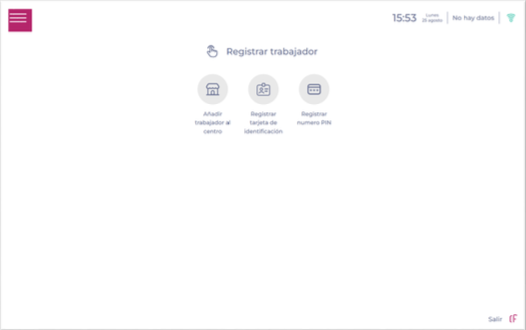
Add employee to a business unit
First and foremost, it's essential to enroll the employee in the specific center where you wish them to be able to clock in.
- Select the employee's original work center.
- After selecting the work center of origin, pick the respective employee from the dropdown menu.
- Upon confirmation, the employee is granted the authorization to work in the designated center.
Register the employee's sign-in codes
Once assigned to a work center, configure the employee’s clock-in method(s):
- Register fingerprint: Start the fingerprint registration process.
- Register ID card: Assign a card to the employee.
- Access Code: Assign an access code.
To successfully manage and register the sign-in codes for the new employee, see Manage employee time & attendance sign-in codes with SmartHub.
Supported languages
SmartHub is available in:
- English
- Spanish
- French
- Portuguese
- Italian
- German (Germany)
- German (Switzerland)
