


Start from: The Workforce module.
Direct way
-
Select Workforce Management > Workforce from the main menu.

-
In the Workforce screen, use the following filters to facilitate your search:
-
Status: select between Current, Former or Prospective workers.
-
Work Center: select the specific work center where the employee whose code you wish to search for is located.
-
Enter the text you wish to search for: Enter directly the first or last name of the employee you are looking for.
-
-
Select Employment Information in the box of the specific worker you wish to add or remove to a work center.

-
In the Labor Period Information table, select New to create a new work period with the new center OR Edit to edit the center in the current period.

-
In the next pop-up window, configure the working conditions for a new period, including the Work Center to which this employee will move.
-
Select Save. In this way, the employee will be released from the previous center and will be transferred to a new one.

Through approval flow
-
Select Workforce Management > Proposals from the main menu .

-
In the Workforce screen, use the following filters to facilitate your search:
-
Status: select between Current, Former or Prospective workers.
-
Work Center: select the specific work center where the employee whose code you wish to search for is located.
-
-
Under Create Proposal, select Modify.

-
In the Proposed Work Status section, select the Work Center to which you want to assign the employee.
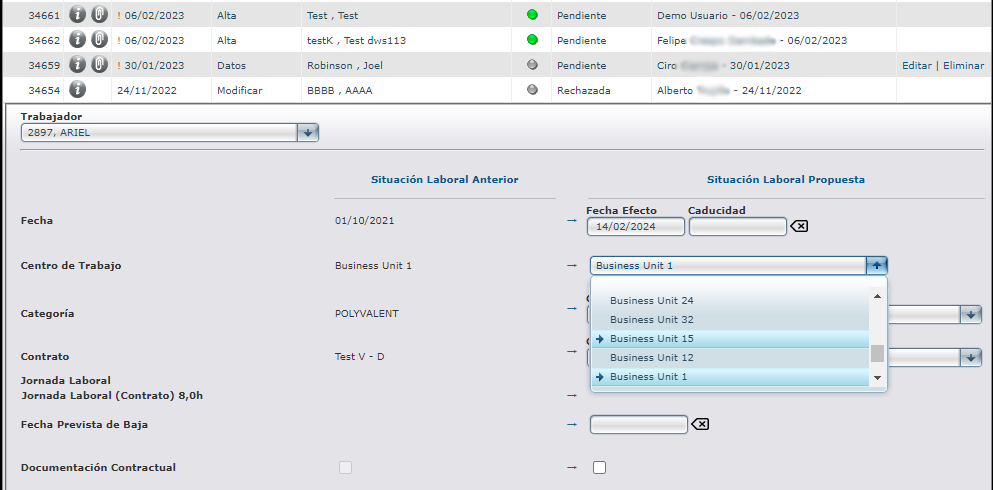
-
Subsequently, this Proposal will go through Supervision and Review, when it will finally be approved or rejected by the decision-maker.
