Point de départ: Le Menu Easilys.
CONNECTER EASILYS À UNE IMPRIMANTE
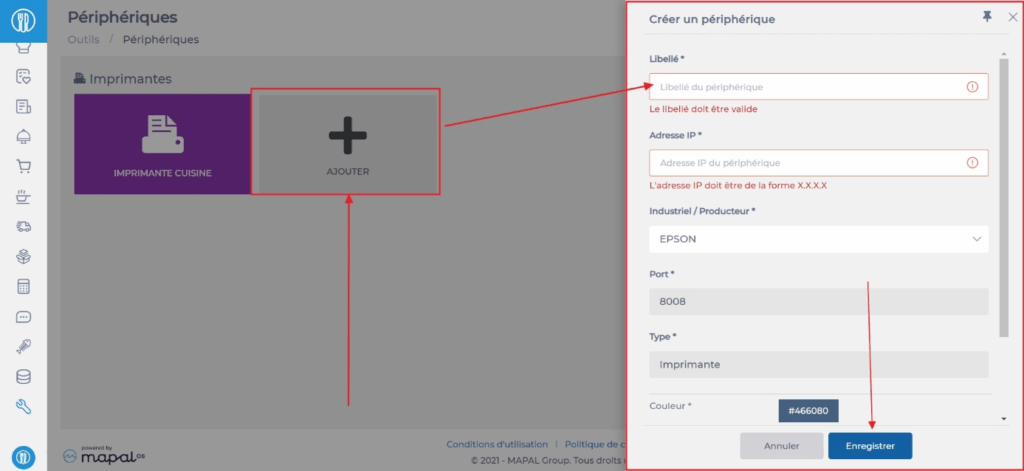
Sélectionnez les onglets Outils > Appareils.
Sélectionnez Ajouter.
Le panneau « Créer un appareil » apparaît sur le côté droit de l’écran.
Renseignez les informations requises. Les champs marqués d’un * sont obligatoires.
Sélectionnez Enregistrer.
CRÉER UNE TÂCHE D’IMPRESSION
Sélectionnez les onglets Recettes > Imprimer les étiquettes.
Sélectionnez + Créer.
Le panneau « Créer une tâche d’impression » apparaît sur le côté droit de l’écran.

Renseignez les informations requises. Les champs marqués d’un * sont obligatoires.
Sélectionnez Créer.
Sélectionnez la tâche créée.
Les détails de la tâche s’affichent sur le côté droit de l’écran.
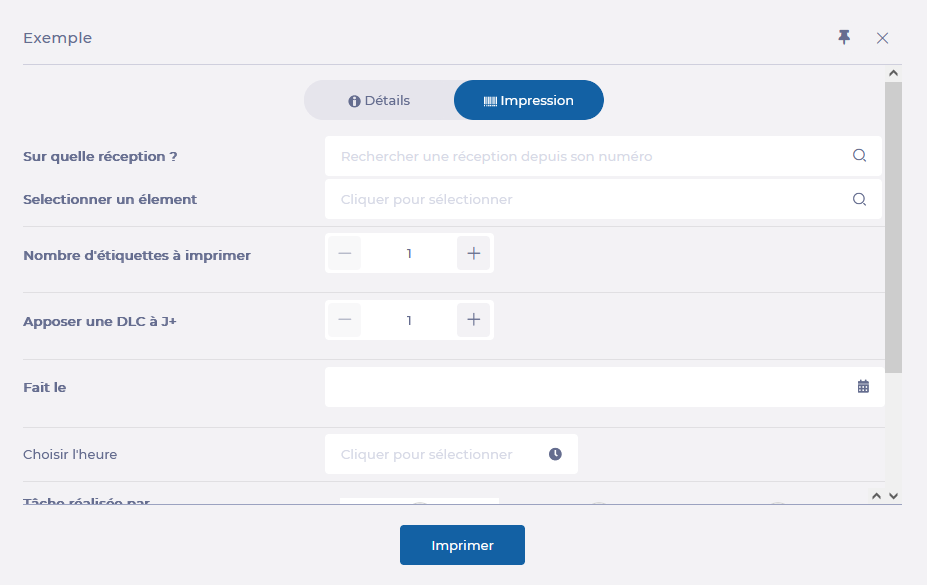
Accédez à l’onglet « Imprimer ».
Configurez les paramètres d’impression.
Sélectionnez Imprimer et attendez la fin de l’impression.