


Start from: the Flow Learning dashboard.
- Select Company > Company Structure from the main menu.
- Select the Branches tile.
- Select the branch name, or select the action menu (...) > Edit.
- In the window, scroll down and select a name from the dropdown list in one or both fields:
- Appraisal Default Reviewer: for appraisals.
- Workbook Default Reviewer: for workbooks.
Note: The appraisal field follows your company's name for appraisals, for example Performance Default Reviewer.
- Select Save.
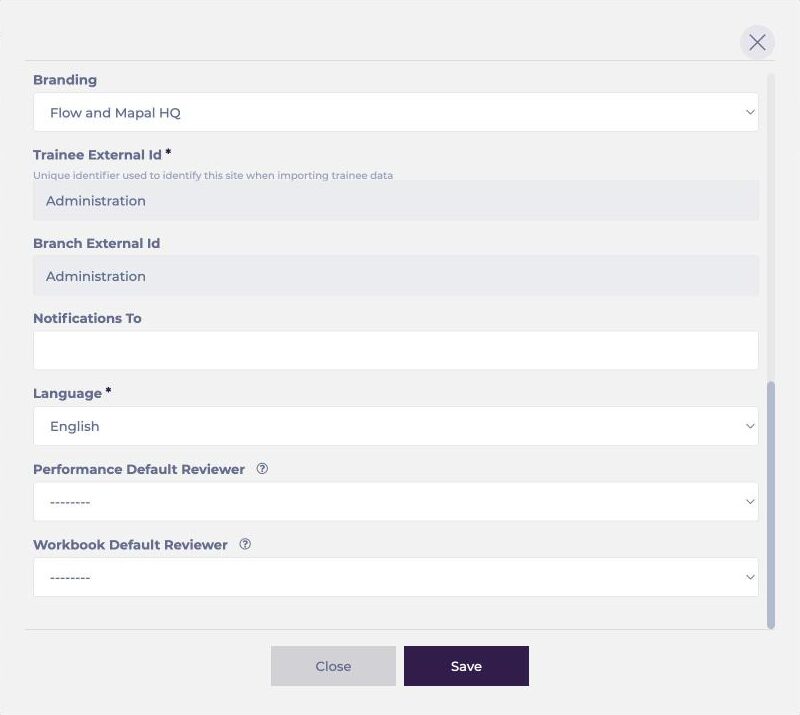
Note: Each default reviewer is automatically assigned to all appraisals or workbooks given to learners in that branch. The appraisal default reviewer is also used when a reviewer is automatically unassigned from an incomplete appraisal.
To assign default reviewers by department, or through L&D Settings, see Set up appraisal reviewers by branch and department.
