


Start from: The Easilys menu.
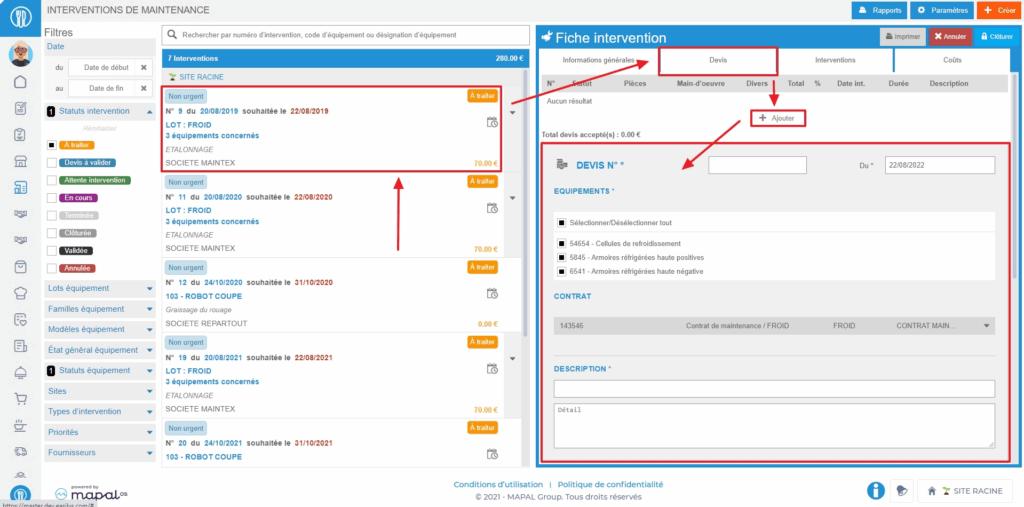
- Select the Equipment > Interventions tabs.
- Select the intervention record on which to place a quote.
The details of the intervention record are displayed on the right side of the screen.
- Go to the "Quotes" tab.

- Select + Add. A blank quote form is displayed on the screen.
- Complete the requested information. Those followed by an asterisk are mandatory.
- Select Save at the bottom right of the quote form to add it to the intervention record.The quote is added to the table visible at the top of the "Quotes" tab.
Important to know: If an orange warning triangle is visible on the quote line, it means that the quote amount is higher than the threshold defined on the equipment record. When you hover over the triangle, a message will display the percentage set for this threshold.

These steps can be performed directly by the maintainer if you have given access to Easilys to them.
For this, you must have created a user account for your maintainer that you will have linked to a user profile specifically designed for MAINTENANCE so that they cannot view all your information available in Easilys and only have access to the screens and actions they need.
To learn more about this type of procedure, see the article Link user accounts to an equipment supplier record.
