


Add supplier responses to a call for tender to be able to compare all supplier proposals - including those not using the supplier portal to compile and evaluate potential contracts.
Start from: The Easilys menu.
Suppliers who wish can contact us to have access to the Easilys Supplier Portal. This portal allows them to respond to your calls for tenders directly on Easilys.
In the case where a supplier does not have access to this portal, they can still send you their response to your call for tender by other means and you will have the possibility to indicate all this in your call for tender on their behalf.
- Select the CALLS FOR TENDERS tab.
You arrive at the list of calls for tenders.
- Select the call for tender with "Published" status, in which you want to add the responses provided by your supplier.
The detailed record of the call for tender is displayed on the screen.
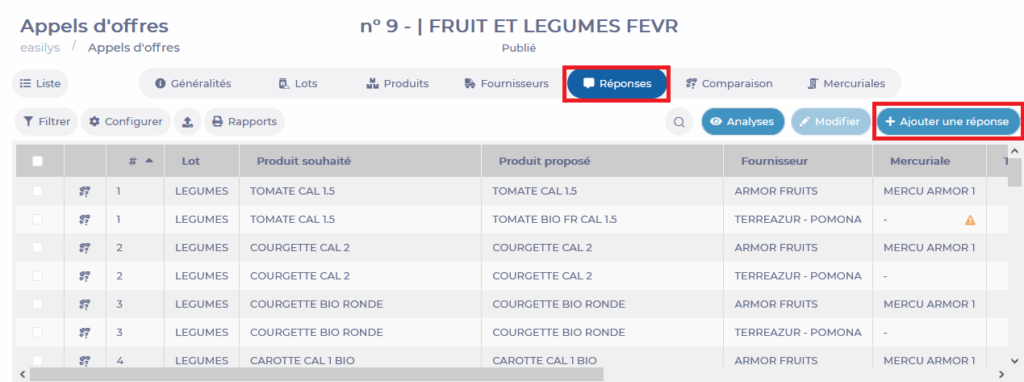
- Go to the "Responses" tab of the call for tender.
- Select Add a response.
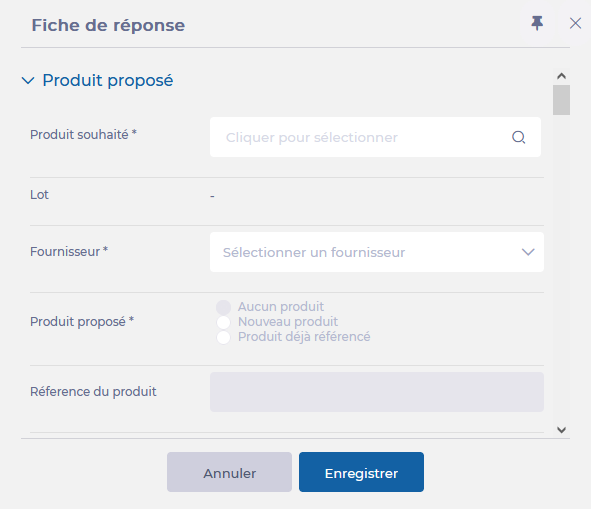
- A blank response addition form is displayed on the right side of the screen.
- Complete the requested information. Those followed by a * are mandatory to validate the addition of the response.
Select Save to validate the addition of the response.
Your response then appears in the responses table.
- To modify the response, select the proposed product and select Modify in its detailed record.
- Repeat the action for each product in the call for tender for which you have received a response.
