


Summary
This release (EASILYS 0.780) enhances communication and control across the platform. Highlights include mandatory read-confirmation for homepage messages, a new invoice generation mode aligned to operational practices, more granular headcount visibility, and menu plan archiving. It also includes targeted UI improvements and stability work across stock, menus, supplier products, integrations, and access management.
Enhancements
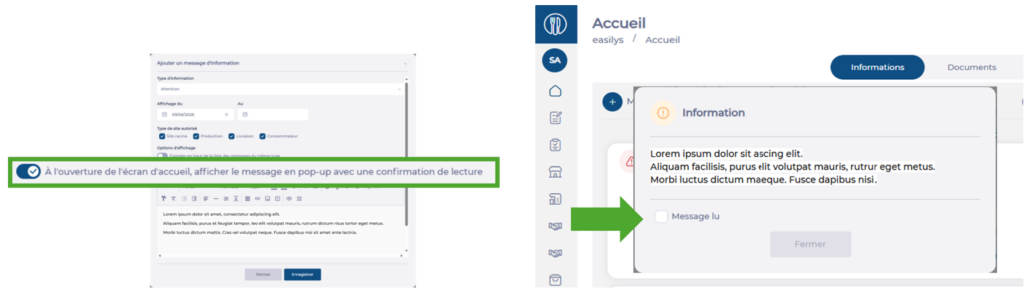
Homepage messages with mandatory read confirmation
Important homepage messages can now appear in a popup that remains visible until the user confirms they have read it.
Why this matters
Critical information is less likely to be missed when displayed prominently and acknowledged.
Key benefits
- Greater visibility for important communications
- Assurance that key notices are acknowledged
- Improved dissemination of operational updates
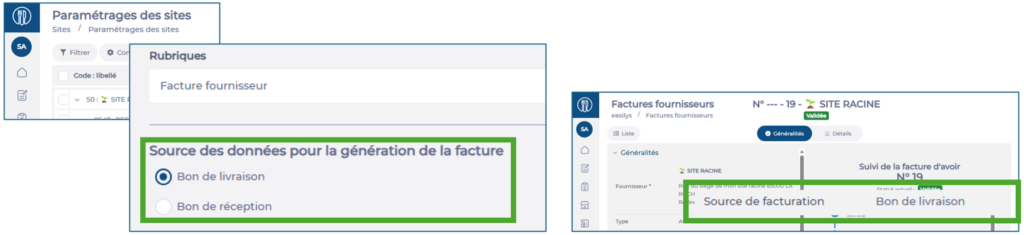
Supplier invoices: flexible generation modes
Sites can now choose how supplier invoices are generated: from the Delivery Note (existing mode) or from the Goods Receipt Note (new mode). Invoices also display their source to simplify review and control.
Why this matters
Different organizations reconcile deliveries, receipts, and invoices in different ways. This flexibility supports local practices and improves traceability.
Key benefits
- Choice between delivery-based and receipt-based generation
- Better alignment with site-level processes
- Clearer traceability with visible invoice source
Headcounts: visibility control by user profile
New permissions enable separate control over forecast, ordered, and billable headcount visibility.
Why this matters
It becomes easier to open relevant screens to external users while protecting sensitive management data.
Key benefits
- More granular control of visible data
- Improved protection of business-sensitive information
- Better alignment with distinct user profiles
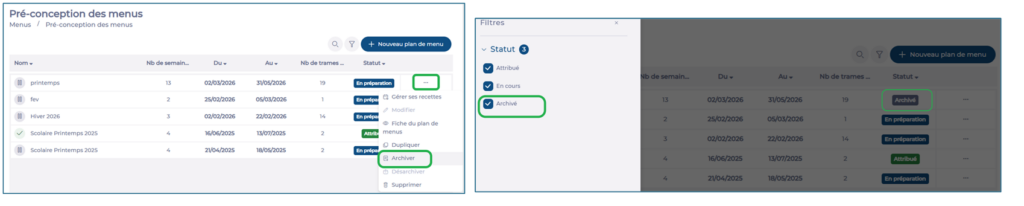
Menu predesign: menu plan archiving
Archive menu plans to remove them from the main list while keeping them available for consultation, duplication, or reactivation. Archived plans no longer impact menus.
Why this matters
As plans accumulate, archiving keeps daily work streamlined and lists easier to navigate.
Key benefits
- Cleaner, easier-to-read lists
- Historical plans remain accessible
- Simplified management of menu plans
Other enhancements
- Equipment location is now displayed in maintenance interventions and related emails.
- Rights Management UI refinements, including clearer partial states, improved identification of beta features, and usability improvements.
Stability and fixes
This release includes general stability improvements and corrections across key areas:
- Improved reliability when working with menu templates and food plans.
- Improved consistency in the calculation of expired stock quantities in Stock V2.
- Refined display and filtering for supplier products in Product Administration V2.
- Improved synchronization-related handling for invoice statuses and supplier data integrations.
- Enhanced robustness and usability in Rights Management.
