


Note: Every action that can be carried out in the application is subject to permissions. If you are unable to perform the actions described in this article, it may be because the required permissions are not activated for your user profile. Contact the Support team or your administrator for more information.
Export a profile's rights
Start from: the Easilys menu.
- Select Sites > Rights management in the main menu.
- In the profile list, select the profile to export.
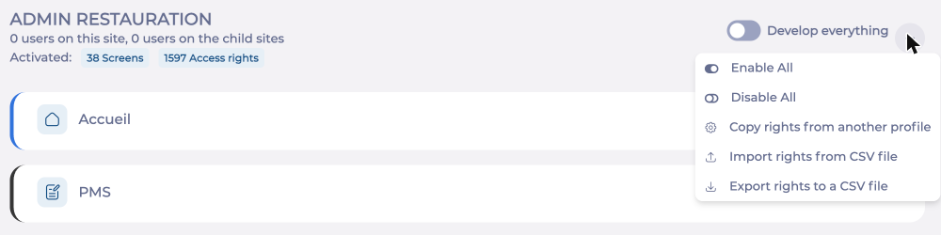
- Select the action menu (...) next to Develop everything, then Export rights to a CSV file.
A message confirms the export, and the file is saved to your browser's download folder. Its name includes the site, the profile, the Easilys version and the export date. You can open it in Excel.
Import rights into a profile
Note: Importing replaces all the profile's rights with those in the file. The rights the profile had before are not kept.
- In the profile list, select the profile that will receive the rights.
- Select the action menu (...) next to Develop everything, then Import rights from CSV file.
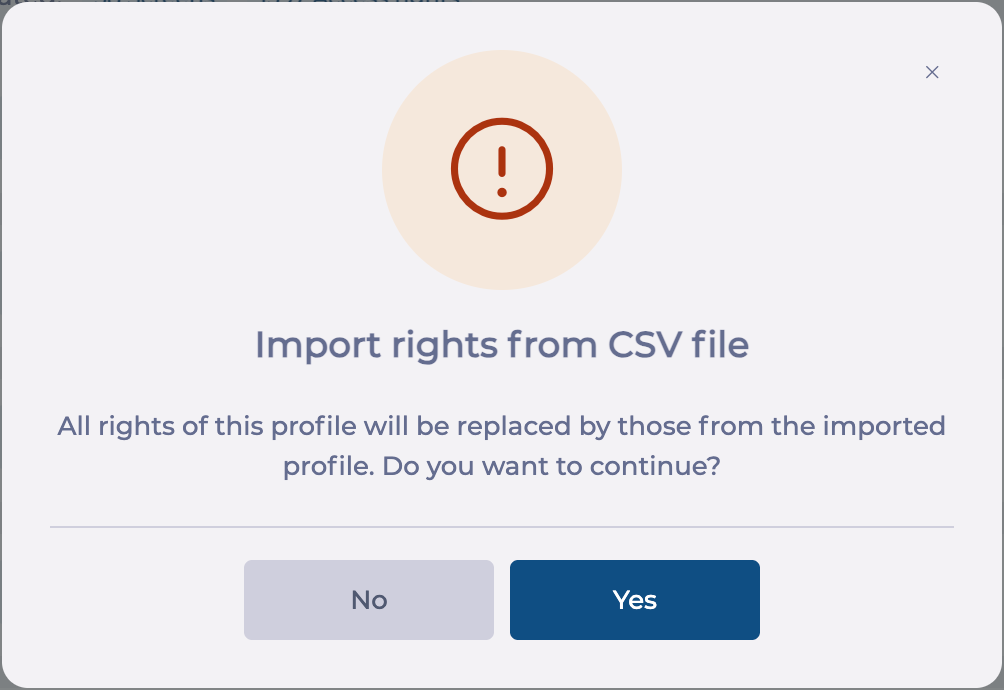
- A message asks you to confirm: All rights of this profile will be replaced by those from the imported profile. Do you want to continue? Select Yes to continue, or No to cancel.
- Select the CSV file to import.
A message confirms the import, and the profile counters (screens and access rights) update.
Note: The import applies immediately: you do not need to select Save. Users who are already signed in must sign in again for the change to apply to their session.
Example: configure several profiles from one
- Configure a reference profile with the rights you want.
- Export its rights to a CSV file.
- Import this file into each of the other profiles concerned.
- Adjust each profile if needed.
To get the same result without a file, you can also copy the rights of another profile: see Copy rights from another profile.
To adjust a profile's rights afterwards, see Configure a profile's rights. To check the result side by side, see Compare the rights of several profiles.
