
Start from: The Easilys menu.
- Select Recipes > Recipes management.
In the Progress section:
- Select the orange pencil icon.
A pop-up window Update the preparation of a recipe appears:
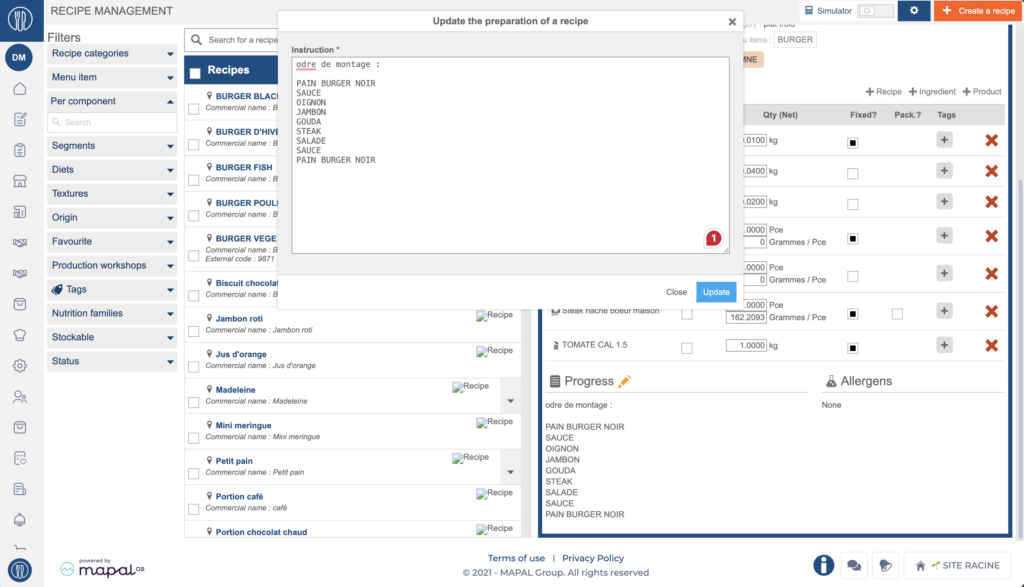
- Fill in the necessary elements.
- Select Update.


Including progress steps in a recipe is important, to provide clear instructions for consistent quality in meal preparation.
If your environment is configured for multiple languages, the multilingual icon appears for some fields. For more information on how to use it, see the article Use Easilys in multilingual mode .
Start from: The Easilys menu.
In the Progress section:
A pop-up window Update the preparation of a recipe appears:
From the Recipe management screen you can select several recipes and generate a report for…
As a product data manager, you can accurately record the allergens for each product (presence…
Use the "Recipe components" tag to specify a specific characteristic for components so you can…
Save time when creating variants or similar dishes, by duplicating recipes. If you duplicate an…
As a restaurant manager, you want to optimize Smart Grammage rules by using recipe categories…
Recipe categories and subcategories allow you to categorize recipes. They can be used to filter…
The production workshop allows you to categorize recipes. It can then be used to filter…
In some of your recipes, you may want to add tap water as a component.…
As a restaurant manager operating with a lab flow model, you need to create a…
As a restaurant manager, you want to understand how to manage your recipes as finished…
