Note: Every action that can be performed in the application is subject to access permissions. If you are unable to perform the recommended actions in the articles you consult, it may mean that the necessary permissions are not enabled for your user profile. Contact the Support team or your administrator to learn more.
Start from: The Easilys menu.
The meal plan frequency table allows you to check if the plan complies with the frequencies recommended by the GEMRCN.
The GEMRCN “Groupement d’Étude des Marchés en Restauration Collective et de Nutrition” has, since its first version in 1999, been a practical guide concerning the nutritional quality of meals served in social collective catering.
http://www.gemrcn.fr/definition-gemrcn
Access to the Frequency Analysis Table
- Select the Nutrition > Meal plans tabs.

- Select the meal plan to analyze.

- Select Frequency Table.
- Edit if necessary the day on which the frequency analysis should be focused.
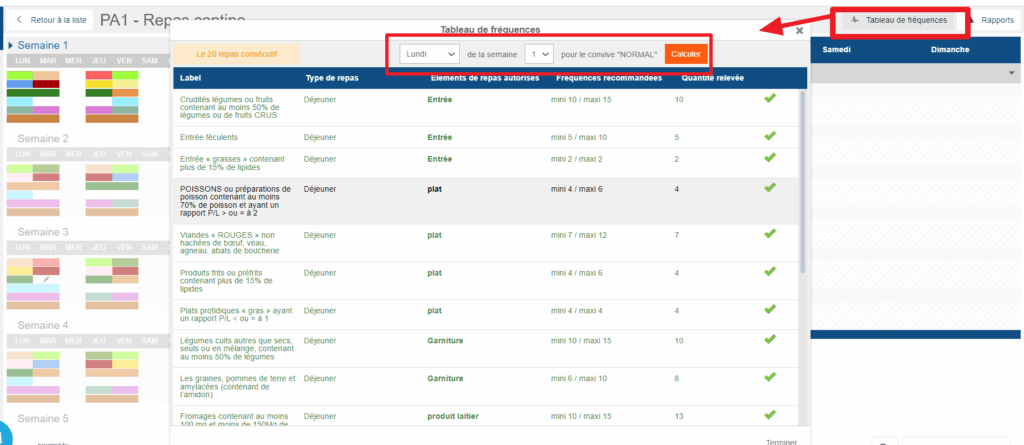
Example: In a meal plan with 7-day weeks, 2 meals over 6 weeks, and an analysis period of 20 meals, if you select "Monday week 1", then the analysis will take into account the nutrition families positioned from Wednesday of week six to Friday of week 1. This means that the plan may be correct on Monday of the first week of your plan, but incorrect on Saturday of the second week since the calculation is different. It is therefore important to check on different days of the meal plan to cover it entirely.
The frequency analysis table alerts you to discrepancies between the frequencies you have indicated as recommended and the displayed meal plan, indicating for each nutrition family whether the observed frequency is correct, insufficient, or excessive:
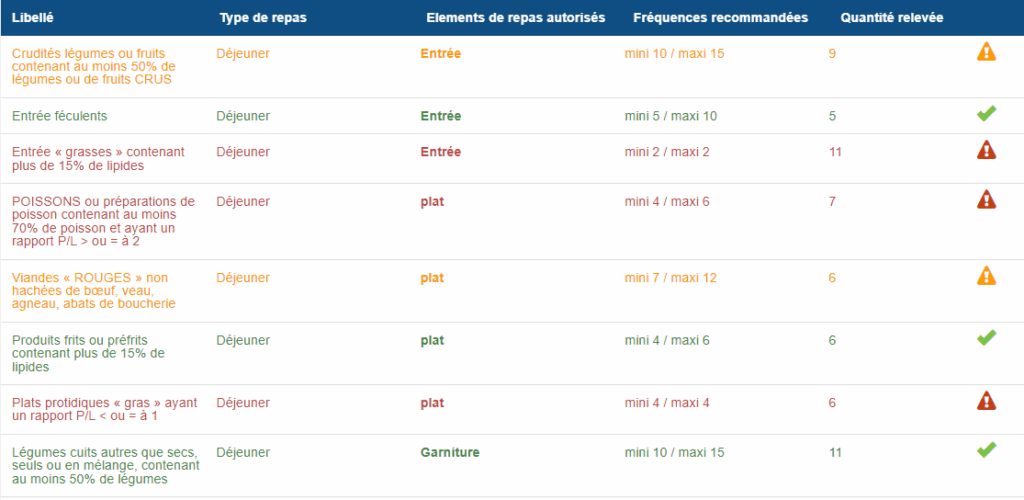
Note: Some nutrition families are not subject to specific frequency recommendations. This means they can be included in the meal plan as desired, as long as this does not prevent compliance with the recommended minimums and maximums for other families.
Changing the Number of Meals Considered for Frequency Analysis:
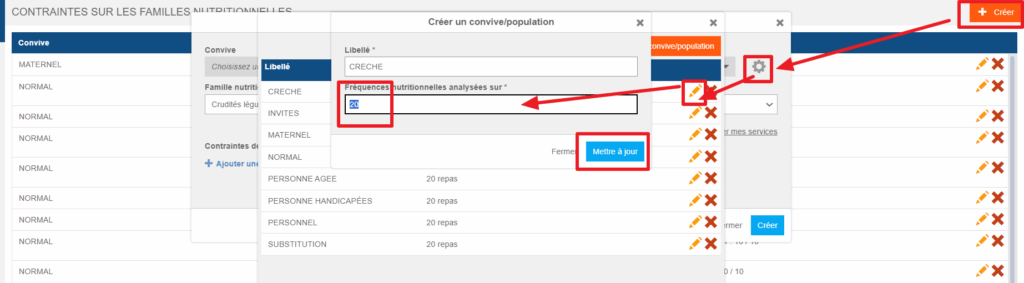
By default, the number of meals considered for frequency analysis is set to 20. If, in your operation, you want the analysis to be carried out on a different number of meals, note that it is possible to modify this for a given guest. This setting is made from the guest administration. You can access it, for example, as follows:
- Select the Nutrition > Constraints on nutrition families tabs.

- Select Create to open the constraint creation window.
- Select the gear icon on the guest's line to open guest administration.
- Select the guest's pencil icon to edit.
- Edit the number of meals to be considered for frequency analysis.
- Select Save.