


Start from: The Easilys menu.
The ENT (espace numérique de travail) is an integrated set of digital services made available to the educational community of one or more French schools. It provides a single entry point through which each user accesses their digital services and content according to their profile.
Before you start
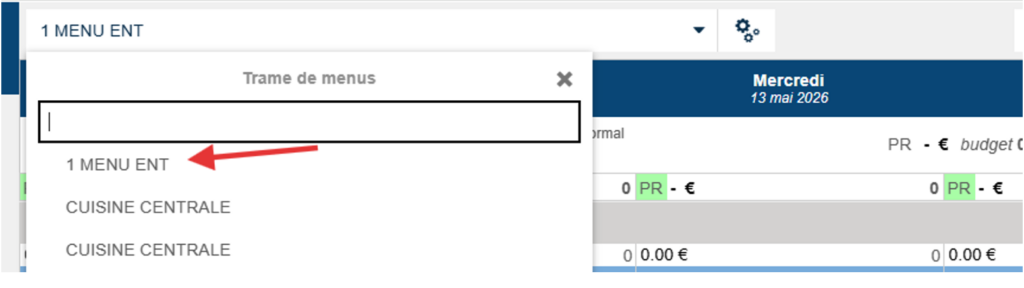
The menu you want to publish to the ENT must appear first in the list.
If you have several templates, add the number 1 before the name of the relevant menu to position it at the top of the list.
Publication steps
Once your menu is correctly configured and displayed first in the list, you can publish it to the ENT.
- Navigate to Menus > Menus.
- Select the In progress status to assign it.
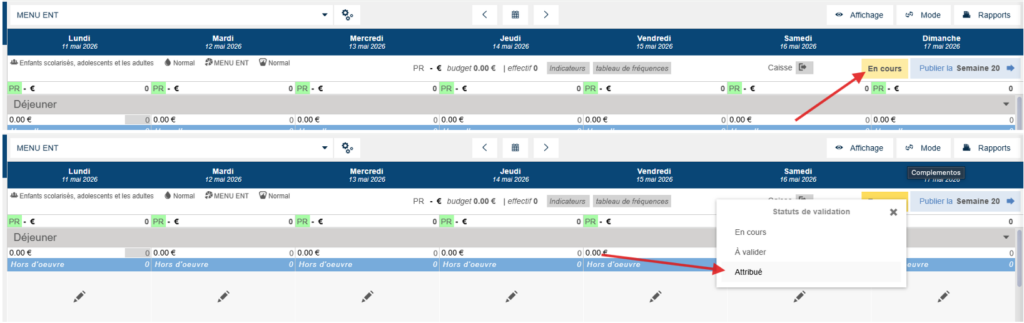
Your menu is visible on the ENT the day after the status is assigned. The display on the ENT covers two weeks of menu.
