


Start from: The Easilys menu.
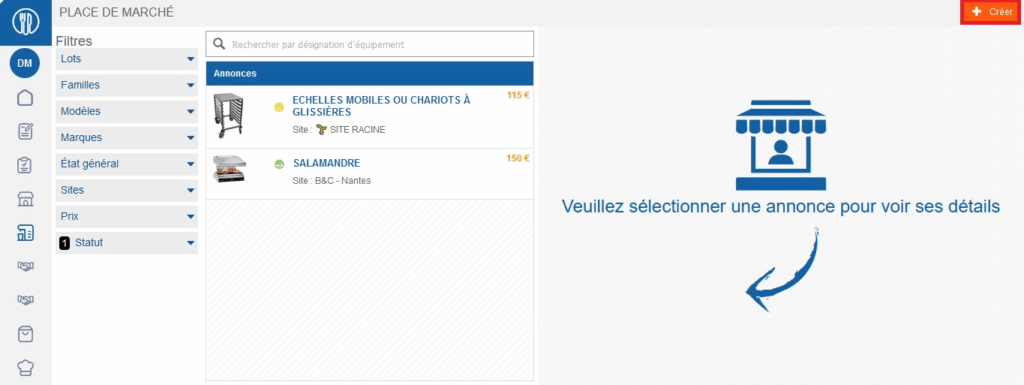
- Select the Equipment > Marketplace tabs.
- Select Create visible at the top right of the screen.
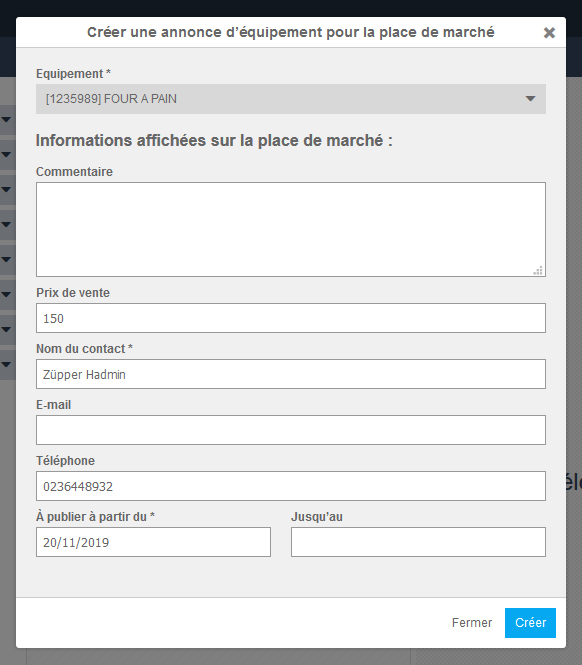
The "Create an equipment listing for the marketplace" window appears on screen.
- Complete the information. Those followed by a * are required to create your listing.
- Select Create.
The listing record is now visible in the list on the left of the listings.
Once someone has responded to the listing, you can deactivate the listing by selecting it from the list available on the left of the screen and then selecting Deactivate visible at the bottom of the listing that appeared on the right of the screen. It will then be hidden by default, but viewable if needed, by selecting the "Inactive" status in the left filter.
Note: It is possible to transfer equipment from one site to another. The procedure is indicated in the article Transfer equipment from one site to another.
