


Start from: The Easilys menu.
Contact your customer success manager to find out more about this feature.
- Select the Products > Price schedule tabs.
- Select a price schedule.
- Go to the "Mark-up" tab.
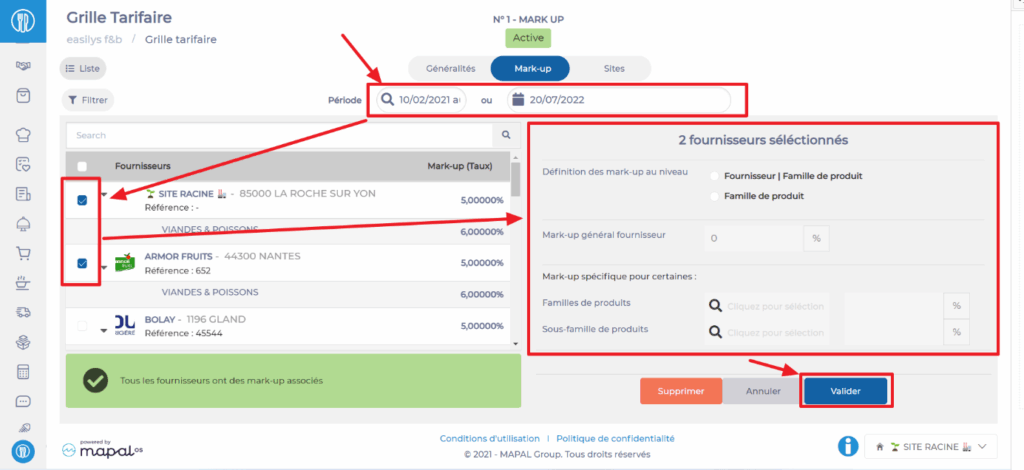
- Select the period on which you want to work.
The list of suppliers is displayed on the left of the screen and mark-up management on the right.
- Select a supplier to apply a general mark-up and/or a mark-up by product family.
- Select "Supplier | Product family" as the mark-up definition.
- Define the general mark-up then a possible mark-up on a product family.
- Select Validate.
- Select the supplier again if you want to add another mark-up on another product family.
- This time select "Product family" as the mark-up definition.
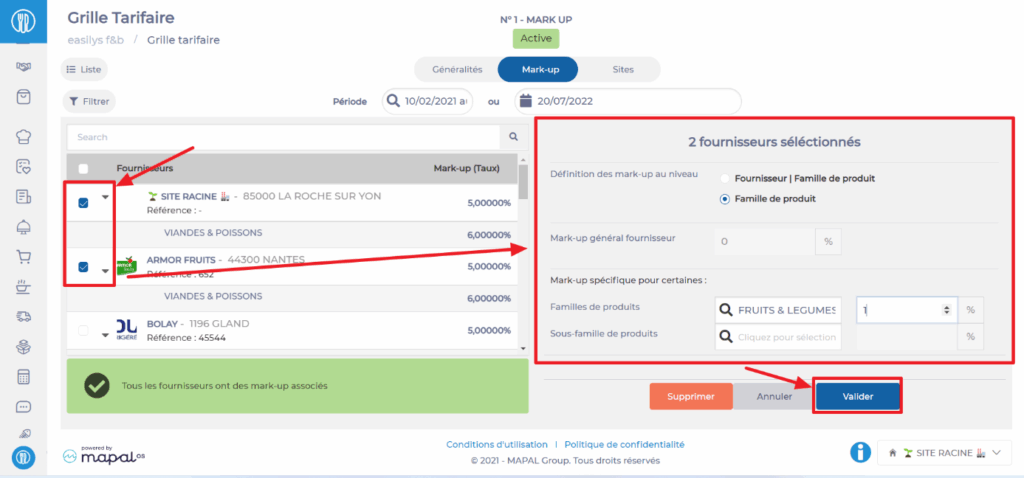
It is possible to select multiple suppliers: it will then be possible to define a general mark-up for all selected suppliers then to define mark-ups by product families and product sub-families.
