


Start from: The Easilys menu.
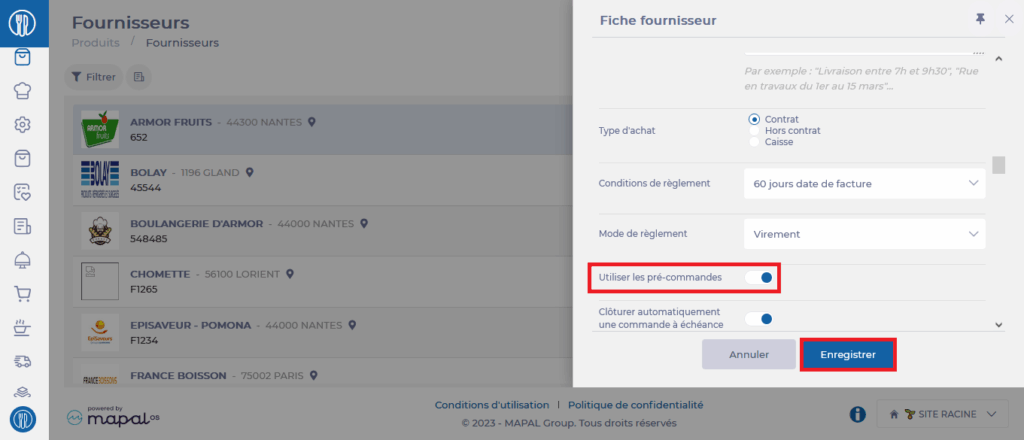
Sending pre-orders is not available by default. It is necessary to enable an option on the supplier record for which you want to be able to send pre-orders.
- Select Products > Suppliers.

- Select the supplier for which you want to view the information record.
- Select Edit at the bottom of the supplier record.

- In the "ORDERS" section of the record, enable the Use pre-orders option.
- Select Save to confirm the modification.
Warning: if the status does not return to Edit after selecting Save, this means that the application was unable to save your modifications.
This most likely comes from the fact that essential information is missing from your supplier record and the application is asking you to complete it before being able to save. A red indication will show you what information is missing. Generally, this involves a missing email address or generated coordinate fields that are empty (you can complete them or delete them).
You have the possibility to adjust your pre-order by modifying it until the pre-order deadline which is the last available date before exceeding the order deadline.
For example, with an order deadline of A for C, I can modify my pre-order up to three days before the delivery date. This information is indicated in the pre-order slip.


Warning: sending an order just before the deadline closes will not be processed as a pre-order, but as a final order.
