


Start from: The Easilys menu.
If you find yourself in a situation where two of your suppliers merge, here is how to proceed.
CONCERNING SUPPLIER RECORDS
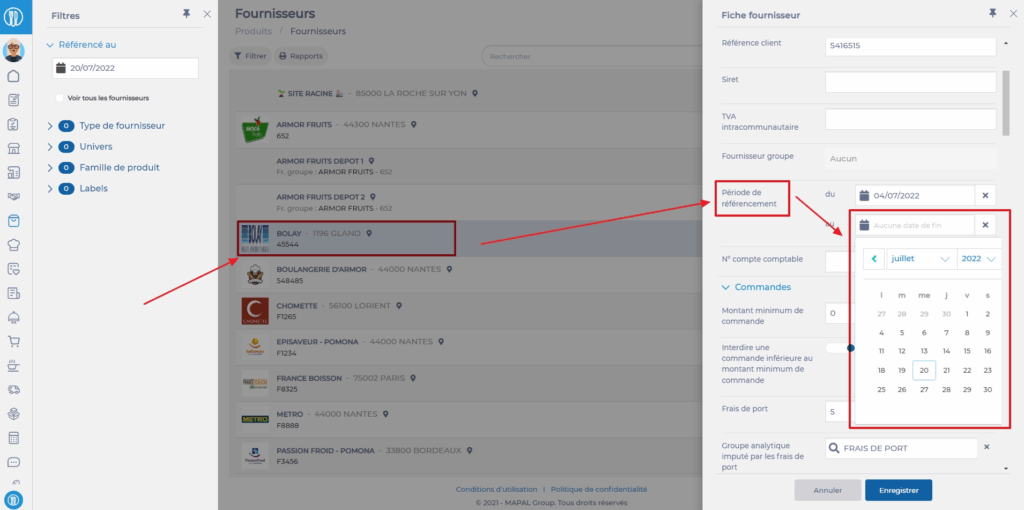
- Select the tabs Products > Suppliers.
- Create a new supplier record.
- Then modify the old supplier records to add an end date for referencing OR delete/detach them.
CONCERNING PRICE SCHEDULES
- Select the tabs Products > Price schedules.
- Select one of the price schedules linked to one of the two old supplier records.
- Select Deactivate.
- Select the pencil icon now available.
The "Update a price schedule" window appears on the screen.
- Replace the linked supplier record with the newly created supplier record.
- Select Update.
- Reactivate the price schedule by selecting Activate.
- Perform this action for each price schedule linked to the old supplier records.

When a price schedule is activated or reactivated, an update is necessary before the products are available for ordering again. This update occurs once a day, usually at night.
