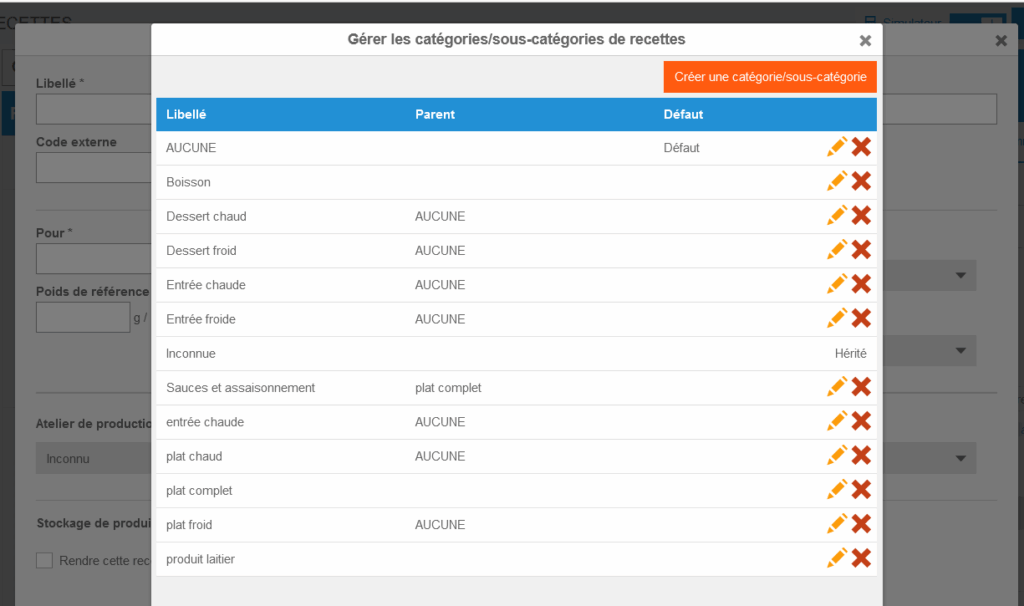
Start from: The Easilys menu.
The more you refine the list of categories and subcategories, the more you can refine your production management. This is a choice to make according to your needs and your internal organization.??
?Recipe category or subcategory creation, deletion and modification can only be performed by administrators with sufficient permissions to perform these actions impacting all sites in the site tree. Contact your administrator or contact us!
- Select the Recipes > Recipes management tabs from the root site.
- Select + Create a recipe.
The "Create a recipe" window displays on the screen.
You are not going to create a recipe if you don't need one, but it is necessary to go to the "Create a recipe" window to access the gear wheel allowing you to administer recipe categories.
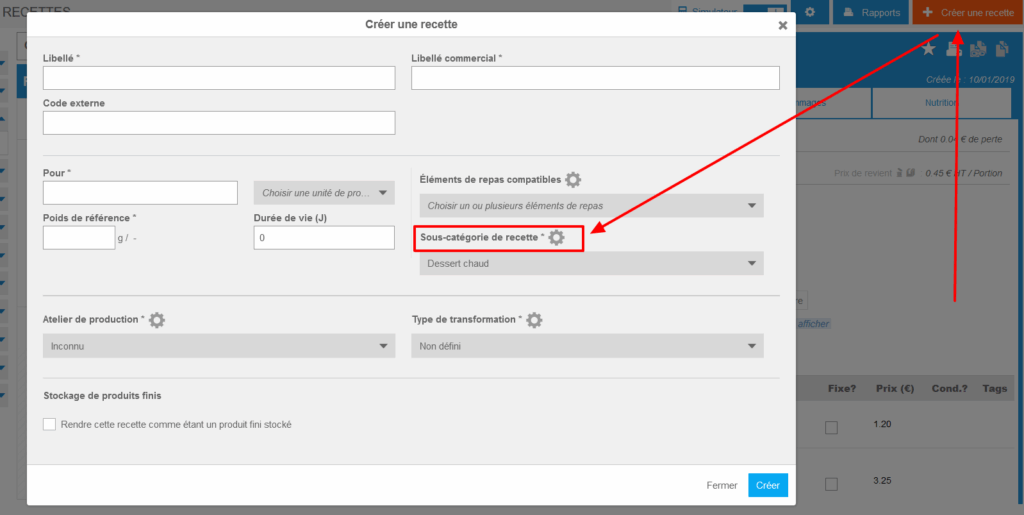
- Select the gear wheel visible at the "Recipe subcategory" level.
The "Manage recipe categories/subcategories" window displays on the screen.
- Select "Create a category/subcategory" to create a new production workshop.
- Enter the category name.
- Indicate the parent category if you want to create a subcategory.
- Confirm creation by selecting Create.
- Select the pencil to modify an existing production workshop.
- Select the red cross to delete an existing production workshop.