


Start from: The Easilys menu.
Note: In certain cases, the reception cannot be reopened if an inventory exists at the date of reception or a later date, or if the invoice has been changed to "Approved for payment".
-
Navigate to Supplier orders > Receptions.
-
Select the Status filter.
The filter unrolls, allowing you to tick the desired options.
-
Check the Finished status to see in the list which receptions have already been validated.
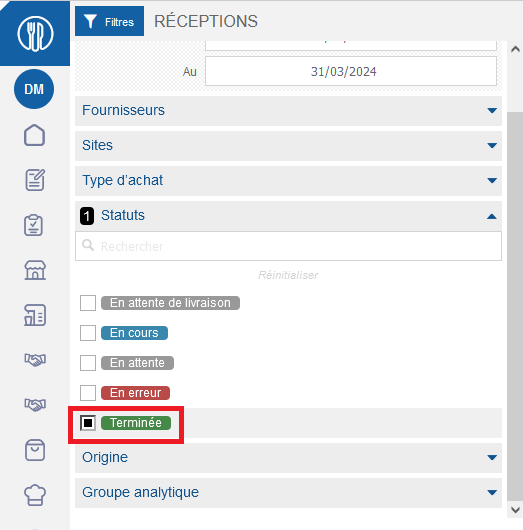
Validated receptions are displayed on the screen.
-
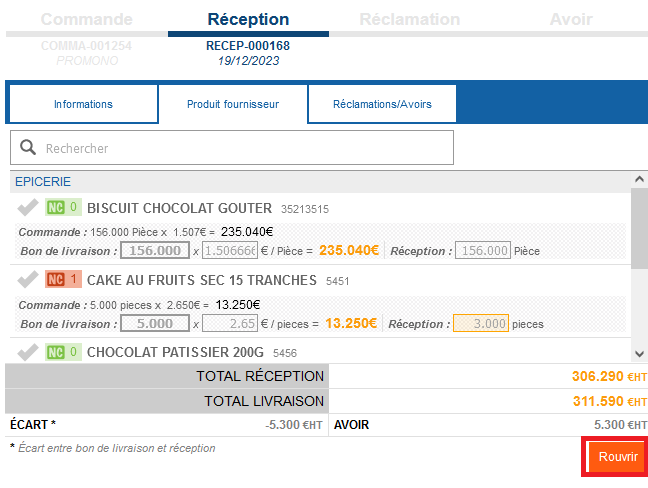
Select the completed reception you wish to reopen.
Reception details are displayed.
-
Select Reopen at the bottom of the receipt.
A confirmation message appears on the screen.
-
Confirm your choice by selecting Open.
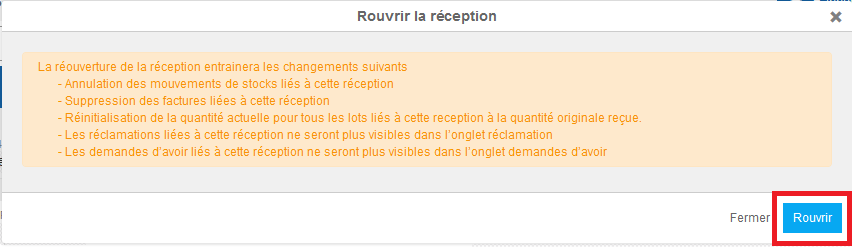
Reception returns to "In progress". Inventory movements are cancelled out by inverse movements.
On the STOCK screen, these movements are visible in the stock movement details.
