


Note: each action that can be performed on the application is subject to access permissions. If you cannot perform the actions recommended in the articles you consult, it may mean that the necessary rights are not activated for your user profile. Contact the Support team, or your administrator, for more information.
Start from: The Easilys menu.
- Select the tabs Recipes > Smart Rendement.
- Select + Create.
A blank "SMART RENDEMENT SHEET" appears on the right side of the screen.
- Complete the information requested in the sheet to compose your rule.
For more information, refer to the section "Detailed explanation of the fields composing the SMART RENDEMENT SHEET". - Select Save to complete the creation of the rule.
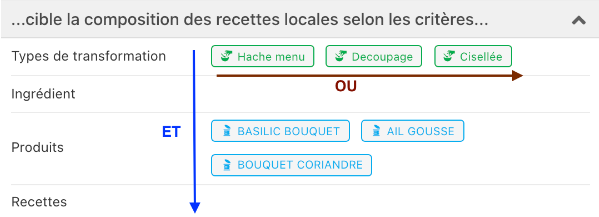
It is possible to combine several criteria in the same Smart Rendement rule. As with all Smart rules, the different values selected in a criterion field are read with an "OR", while the criterion fields are read with an "AND".
Below, it is therefore read that the Smart Rendement rule must apply if the recipe is linked to the transformation type "Hache menu"OR"Decoupage"OR"Cisellée"ANDwill apply to the industrial product "BASILIC BOUQUET"OR"AIL GOUSSE"OR"BOUQUET CORIANDRE" (if a recipe contains all three products, then it will apply to all three products).
Detailed explanation of the fields composing the "SMART RENDEMENT SHEET"
The rule...
Rule name: This field is automatically completed according to the values entered in the criteria if you do not enter anything.
Status: You can specify whether the rule should be active or inactive.
... targets the composition of local recipes according to the criteria...
Ingredient: Yield rate variations operate on industrial products and not on generic ingredients. By selecting one or more ingredients here, all industrial products linked to this ingredient will be affected.
Example: Imagine that the ingredient BEEF is linked to the industrial products "Whole Beef Fillet 1Kg" and "Beef Fillet 250gr", these two products will then be impacted by the yield rate variation since the Smart Rendement rule applies to the generic ingredient BEEF.
Thus, recipes composed of either the ingredient BEEF or these two industrial products (which could be used in a recipe through another generic ingredient, since an industrial product can be linked to several generic ingredients) will be impacted.
Products: All recipes that use the selected product(s) will be impacted.
Note: Note that if the product selected here appears in a recipe following the application of a Smart Selection rule, the recipe will indeed be affected by the Smart Rendement rule.
Example: The Smart Rendement rule applies only to PRODUCT A. PRODUCT A is linked to ingredient ING A. The recipe "Delicious Recipe 1" uses ingredient ING A.
Ingredient ING A is linked to 10 industrial products including PRODUCT A. PRODUCT A is not the cheapest industrial product of the lot, but it is the one used because a Smart Selection rule applies.
The Smart Rendement rule will therefore apply to the recipe.
Transformation type: You can associate a "transformation type" with a recipe. By specifying one or more transformation types here, you ask Easilys to apply the yield rate to recipes with this or these transformation types.
Recipes: All products within the selected recipes will be affected by the yield rate variation
... and/or the composition of recipes inherited from child sites...
Sites: This criterion is separate. It allows impacting recipes "inherited" by the targeted sites to, for example, attribute yield variations due to defective equipment. In the absence of this criterion, your rules will only apply to "local" recipes where the Smart Rendement rules are created.
Example: The ROOT SITE is the owner of 50 recipes. These 50 recipes are "local" recipes of the ROOT SITE. The Smart Rendement rules created on the ROOT SITE will therefore apply to these 50 recipes and not to other recipes created on other sites.
If you want to apply a Smart Rendement rule to all recipes, those created on the site and those created on child sites, then you will use this field to specify on which sites the rule should also apply to their recipes.
... and applies this yield rate variation
Rate: This field allows you to indicate the negative or positive variation in "%" to apply.
