


Start from: The Easilys menu.
Example: A recipe for rillettes and bread is planned on the menu.
- A Smart Delivery rule has been created for the bread, so that it is delivered directly to the consumption site.
- However, a three-day delay between delivery and production affects the recipe: as a result, the bread will also be subject to this delay and will be delivered three days before consumption at the consumption site.
- To avoid this, you should indicate a delay between delivery and consumption on the supplier record, which will only affect products impacted by a Smart Delivery rule.
Set the delay between delivery and consumption
- Select Products > Suppliers.
- Select, from the list, the supplier record concerned by this delay.
The supplier record appears on the right of the screen:
- Select Edit at the bottom right of the supplier record.
- Select the Deliveries tab.
In the Delay between delivery and consumption line:
- Enter the desired number of days.
- Select Save.
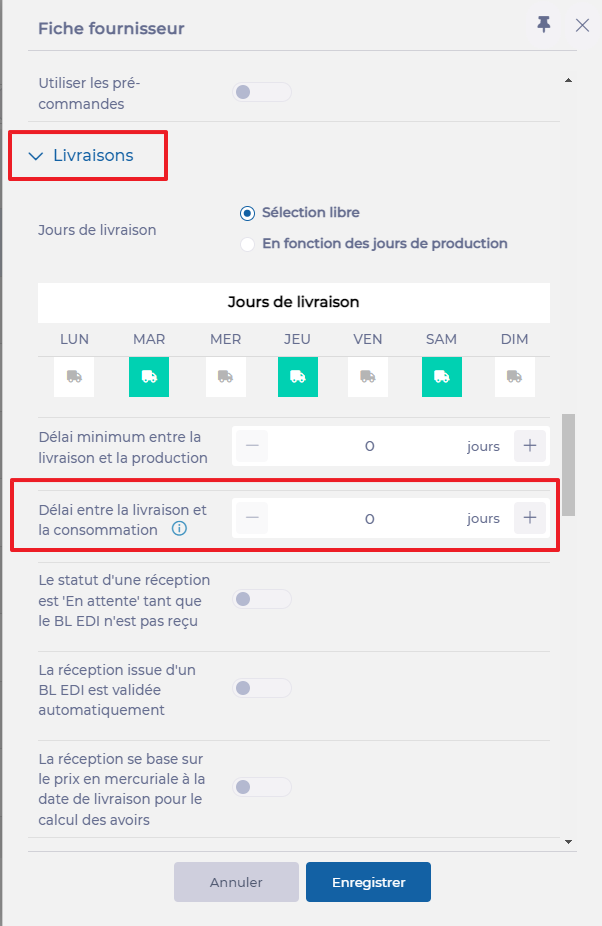
This delay will apply only to products from this supplier that are impacted by a Smart Delivery rule.
