


Start from: The Easilys menu.
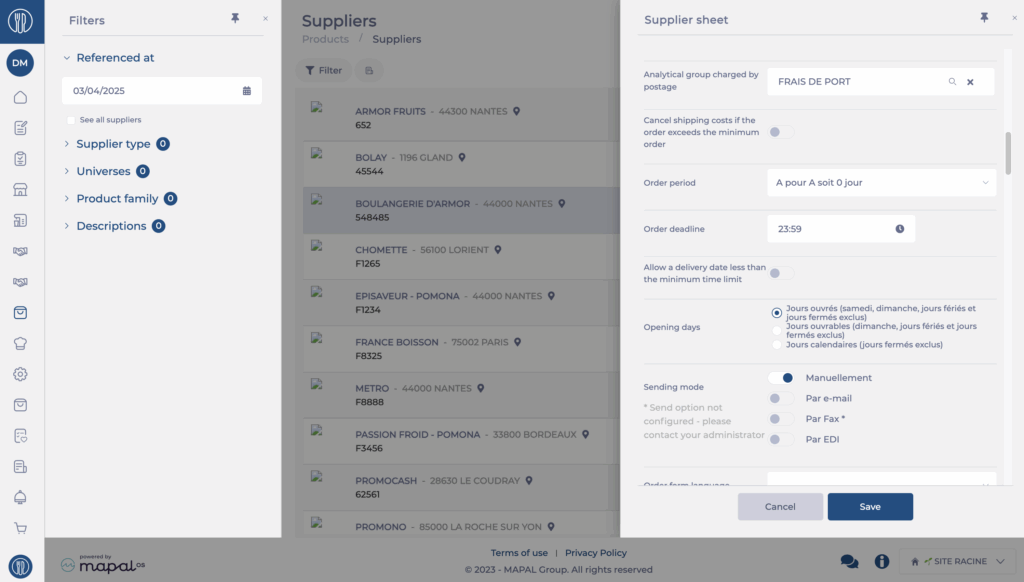
Entering the order lead time and cutoff time allows Easilys to determine the latest an order can be sent to the supplier based on the expected delivery date. However, you can relax this rule by enabling the option Allow a delivery date less than the minimum deadline. In this case, you will be notified that the order is outside the permitted lead time, but you will still be able to validate it.
Note: Even if you enable the option Allow a delivery date less than the minimum deadline, you cannot send an order, even manually, if the delivery date is in the past.
The order lead time takes into account the configured opening days. If your supplier operates on business days, Saturdays, Sundays, public holidays and any other closed days are excluded from the calculation.
Example: If you have an order lead time of two days and you try to send your order on Friday for delivery the following Monday, you will not be able to do so if the supplier is configured to use business days. If the supplier is configured to use calendar days, you will be able to send the order, as it will be three days before the requested delivery date.
The cutoff time is also important: even if you meet the order lead time, you will not be able to send the order if the cutoff time has passed.
Example: If you have an order lead time of one day and a cutoff time of noon, and you try to send the order on Thursday at 2 p.m. for delivery the next day, you will not be able to do so. You must send the order before noon.
